Voice Recognition Software: A Practical 2026 Guide

You're halfway through an email when you stop typing and start speaking. In a quiet room, the words appear quickly and the shortcut feels obvious. In an open-plan office, however, an espresso machine, a nearby conversation, or your own accent can turn a polished sentence into something that needs more correction than the original typing would have required.
That tension defines voice recognition software in 2026. Modern systems can make dictation feel almost instantaneous, but their performance still depends on what you say, how you say it, where you say it, and where the audio is processed. Whether a tool is "accurate" matters less than whether it stays dependable in your actual work.
Table of contents
- What voice recognition software does today
- How the technology turns speech into text
- How accurate voice recognition has become
- Why accuracy still breaks outside benchmarks
- Cloud vs on-device deployment
- Where voice recognition software is used most
- Choosing voice recognition software in 2026
What voice recognition software does today
A project manager leans toward her laptop and dictates a follow-up email while the espresso machine whirs two desks away. The software captures her speech, turns it into text, inserts punctuation, and places the result in the email composer. She doesn't need to touch the keyboard, but she still needs to notice whether the system heard a product name correctly.
That example describes speech recognition, the part of voice technology that converts spoken audio into text or commands. It's closely related to, but separate from, voice biometrics, which attempts to identify who's speaking by analyzing characteristics such as vocal patterns. A dictation tool cares primarily about the words. A banking authentication system may care primarily about the speaker's identity.
The category now includes far more than traditional dictation software:
- Built-in device input: iOS, Android, and Windows offer speech-based typing and commands.
- Meeting transcription: Zoom, Microsoft Teams, and Google Meet can turn conversations into searchable text.
- Clinical documentation: Medical scribe systems capture clinician speech and help structure notes.
- Automotive controls: Drivers use voice commands for navigation, calls, and infotainment.
- Smart home assistants: Alexa, Google Assistant, and Siri respond to spoken requests and control connected devices.
These products may look different, but many rely on the same broad family of neural speech models. Consumer dictation and enterprise transcription are converging around engines that capture audio, recognize language, infer context, and return usable text.
Practical distinction: Voice recognition software can mean both everyday voice typing and specialized workflow automation. Always check whether a product transcribes speech, identifies speakers, executes commands, or combines all three.
For a practical look at using speech as a computer input method, voice control for your computer covers the input side. Voice recognition is now an input layer across phones, desktops, meetings, cars, and professional systems, not a standalone product category.
How the technology turns speech into text
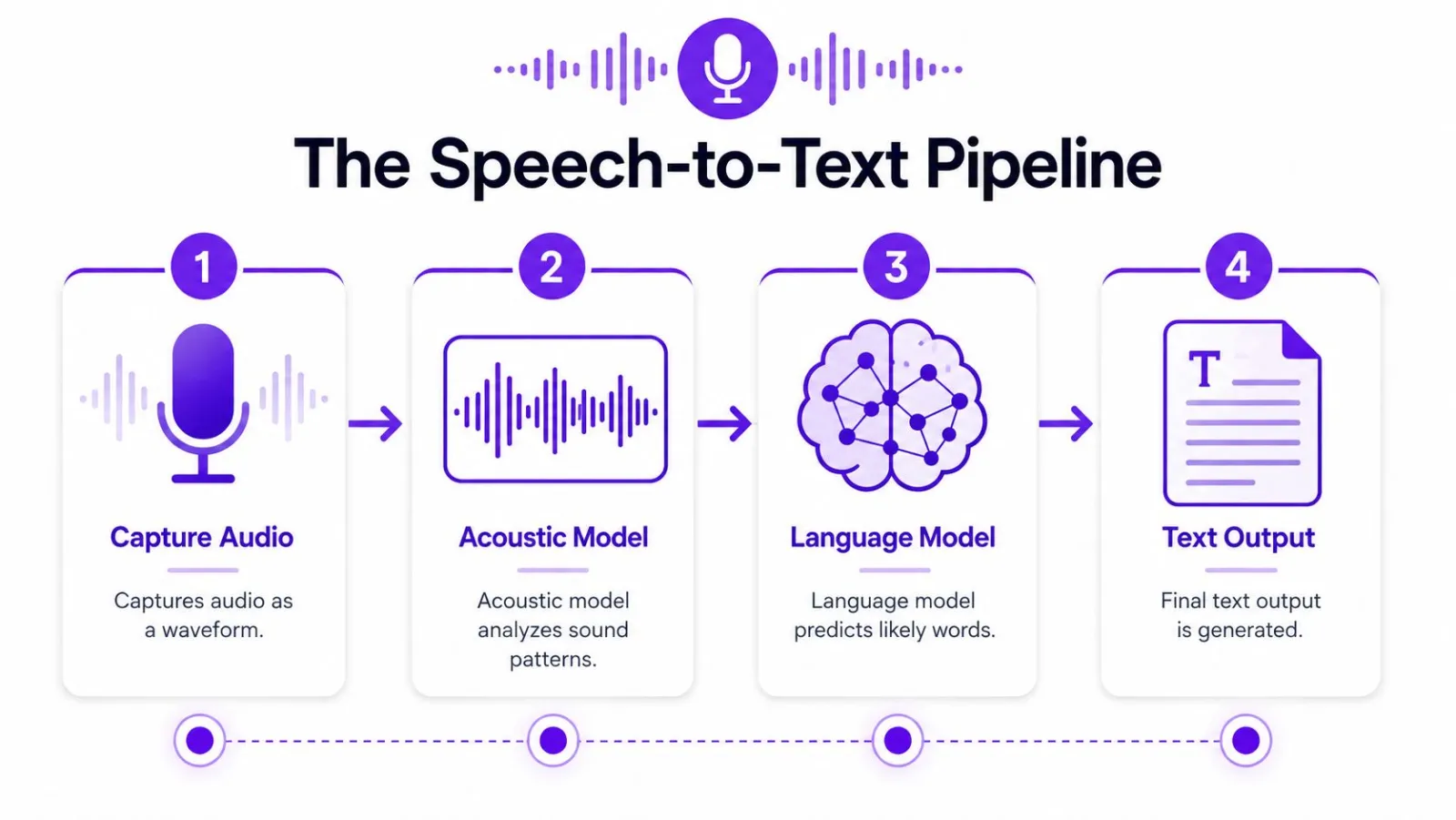
A modern speech-to-text system processes speech in several stages. It captures the signal, identifies likely sounds, uses language context, and formats the result as usable text.
From sound to likely speech
First, the microphone captures a waveform. Your voice creates changing air pressure, and the microphone converts those changes into an audio signal. Preprocessing can adjust volume, reduce some background interference, and divide the stream into manageable pieces.
Next, an acoustic model studies the sound. It examines patterns associated with phonemes, the small sound units that distinguish words. The model does not begin with a complete sentence. Instead, it estimates which speech sounds are plausible at each moment. Accents, overlapping speakers, and noise can make those estimates less certain.
Then, a language model supplies context. If the audio could represent either "send the invoice" or "send the in voice," the surrounding sentence makes the first interpretation more likely. The model predicts the next word from what has already been recognized.
Combining evidence into text
The decoder combines acoustic evidence with language context. It compares possible word sequences and selects the interpretation that best fits both the recording and the surrounding sentence. This helps recover words that were not pronounced perfectly, but it can also turn unusual names or specialist terms into familiar words.
Older speech systems commonly relied on hidden Markov models and Gaussian mixture models, often abbreviated HMM-GMM. Deep neural networks and transformer architectures later became central because they can learn richer relationships from larger audio and text collections. Training requires paired examples, spoken recordings matched with written transcripts, together with language data showing how words normally fit together.
For a broader technical explanation, ASR technology for voice AI examines the automatic speech recognition field. Developers assessing application integrations can also consult this speech-to-text API guide, especially when comparing hosted services with software running locally.
The final stages turn recognition into readable output. Endpointing detects when a speaker has paused or finished. A second processing pass can add punctuation, capitalization, and formatting. Some systems also detect filler words, duplicated words, and self-corrections. Azure Speech documents support for recognizing disfluencies and removing them from display text while automatically punctuating results in supported configurations (Azure display text formatting).
Finally, the application receives a text string. It may appear in a document, chat box, terminal, meeting record, or structured business field. Latency and accuracy can differ between cloud and on-device processing, while the final experience also depends on how reliably the software inserts text into the active app.
How accurate voice recognition has become
Word error rate, or WER, measures how many words a system gets wrong compared with a reference transcript. It counts substitutions, deletions, and insertions, so a lower score is better. A result near 5% doesn't mean every sentence is flawless, but it represents a very different experience from a system that frequently loses the subject, verb, or key noun.
Microsoft reported a 43% word error rate in 1995-era systems, falling to 15.2% by 2004. On the Switchboard conversational speech task, Microsoft later announced results of 6.3% and 5.9% in 2016, followed by 5.1% in 2017, describing that final result as comparable to professional human transcribers (Microsoft's speech recognition milestone).
That progression mattered because dictation became less like issuing rigid commands and more like speaking naturally. Lower error rates support continuous dictation, punctuation recovery, and editing commands. A user can dictate an entire thought, correct a phrase, and continue without training the system to recognize every individual command.
Why the benchmark shift changed the product
The improvement came from several developments working together, including statistical machine learning, more computing power, and larger training corpora. Once systems became accurate enough that correcting the output took less effort than typing the whole passage, voice input became practical for email, notes, accessibility, and enterprise transcription.
A quality benchmark can still mislead. Test conditions are controlled, speakers may be well represented in the training data, and the audio may be cleaner than what a user encounters in a kitchen, vehicle, clinic, or shared office. UCaaS voice evaluation by ConnectCX makes the same point for calls: judge voice quality across the whole conversation, not by one score.
The historical curve explains why today's tools feel capable. It doesn't guarantee that every speaker, microphone, language, or environment will receive the same result.
Why accuracy still breaks outside benchmarks
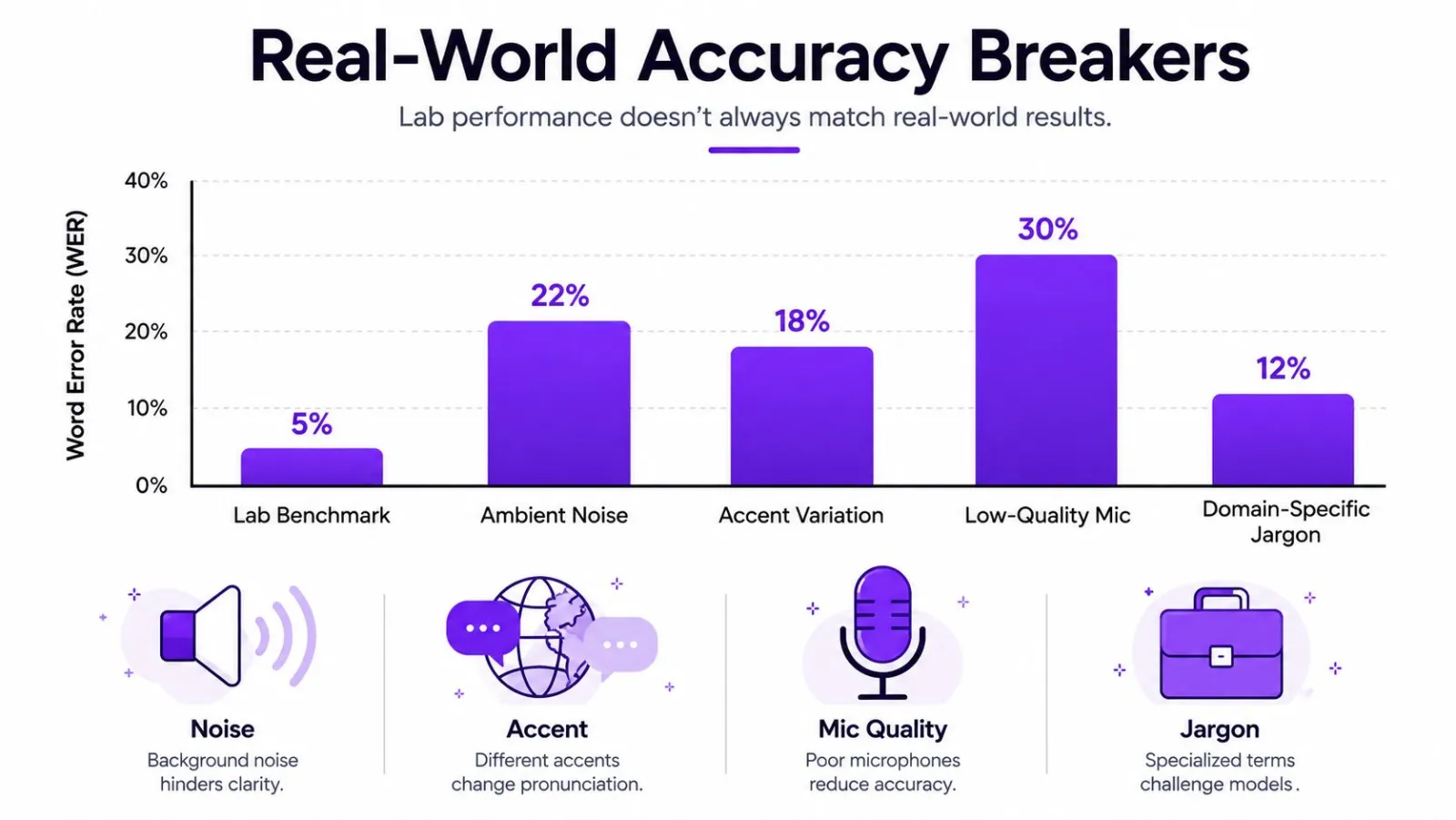
A clean benchmark and a real conversation test different things. Accuracy often drops because of noise, accent variation, microphone quality, and vocabulary. The same engine can perform well in a quiet room yet struggle in a vehicle, clinic, or shared office.
Noise changes the signal
In a comparative study, a generic speech model's WER increased from 12.3% in quiet conditions to 20.8% in 65 dB noise, while a fine-tuned model recorded 6.7% in quiet and 11.5% in noisy conditions (comparative speech recognition results). An open-plan office can therefore feel much harder than a quiet room. Background sound masks the speech patterns the model must separate from competing audio.
Hospital dictation makes the trade-off clear. Ventilation, alarms, movement, and nearby conversations may all overlap with a clinician's voice. Noise suppression can reduce interference, but it cannot recover details that the microphone never captured. Cloud processing may provide more advanced enhancement, while on-device tools avoid sending the recording elsewhere, so the choice involves both recognition quality and data handling.
Accents and dialects expose training gaps
Accent performance depends on how well the training data represents each speaker. Multi-accent and multilingual training reduced WER by up to 13 percentage points against weaker baselines in the cited comparison, yet underrepresented accents still trailed better-represented accents by 15 to 20 points.
The effect appears in multilingual households, international teams, and customer service. One speaker may dictate smoothly while another makes frequent corrections, even with the same microphone and vocabulary. Testing with representative speakers matters more than relying on a single headline accuracy score.
Microphones and vocabulary matter on their own
A poor microphone adds reverberation, compression, and handling noise before recognition starts. A better microphone improves the captured signal, but it cannot resolve every accent or terminology issue.
Domain vocabulary creates a separate failure mode. A developer might dictate an unfamiliar library name, a lawyer a case citation, or a clinician a specialized drug name. The audio can be clear while the language model selects a common word. Custom vocabulary, terminology biasing, and testing with real phrases provide a more practical basis for choosing software than a generic accuracy promise.
Cloud vs on-device deployment
Cloud and on-device systems make different trade-offs. A cloud engine sends audio to remote infrastructure for processing, while an on-device engine performs recognition locally or mostly locally. Neither wins every case.
| Dimension | Cloud, such as Whisper API, Azure, or Google | On-device, such as Whisper.cpp, Vosk, or Apple |
|---|---|---|
| Latency | Depends on network quality, upload time, server load, and response streaming | Can feel responsive after the model loads, with no network round trip |
| Privacy posture | Audio leaves the device, so retention, processing, and vendor policy require review | Audio can remain on the device, reducing external transfer |
| Offline use | Usually limited or unavailable without connectivity | Designed for local use when the model and app are installed |
| Language coverage | Often broader, especially with large hosted models | Depends on the selected model, device capacity, and language support |
| Accuracy ceiling | Large remote models can provide strong performance and specialized services | Local models may require more compromise between model size, speed, and accuracy |
| Integration | APIs can support centralized workflows, automation, and administration | Local integration can reduce service dependencies but may require more engineering |
| Cost model | Commonly tied to usage or processing volume | Avoids per-use cloud charges, but shifts cost toward hardware and maintenance |
Cloud processing is attractive when you need broad language support, large models, centralized administration, or deep workflow integration. It also introduces network dependence and a privacy review. "Cloud" doesn't automatically mean unsafe, but you should understand where audio goes, how long it's retained, whether it's used for improvement, and which contractual controls apply.
On-device processing suits travel, sensitive recordings, predictable local use, or environments with unreliable connectivity. A local model can also reduce the number of external services involved. The trade-off is that a laptop or phone must have enough storage and memory, and language or accent coverage may not match the strongest hosted option.
Latency can be excellent locally, but it still varies by implementation. One streaming, privacy-sensitive on-device voice-typing system reported average output latency of 220 milliseconds for English and 252 milliseconds for Korean, alongside a 13.94% WER on a Korean voice-typing dataset (on-device streaming ASR research). Responsive output and high accuracy are separate targets.
Decision rule: Choose cloud processing when maximum model capability and integration matter most. Choose on-device processing when local handling, offline access, or predictable usage matters more than the highest possible recognition ceiling.
Before deciding, on-device speech-to-text covers the local-processing side of the trade-off.
Where voice recognition software is used most
A clinician dictates a visit summary while examining a patient. A field inspector records observations with both hands occupied. A developer speaks a note beside a terminal instead of switching between a keyboard and a device. These are different jobs, but they share a need for quick input without breaking attention.
Healthcare uses speech recognition for clinical notes and documentation. Specialized vocabularies can improve results, but transcription errors still require review. Medical speech systems should support professional oversight rather than encourage users to accept generated text blindly.
Accessibility is one of the clearest practical applications. Voice input can help people with motor impairments, dyslexia, repetitive strain injury, or temporary hand limitations. Speed is part of it. The bigger part is a different way to interact with software at all.
Software development presents a difficult test because code contains symbols, identifiers, punctuation, and uncommon names. Voice coding tools and editor integrations can help with comments, documentation, navigation, and selected coding tasks, but developers still need a reliable correction method and careful handling of syntax.
Legal work places emphasis on confidentiality, formatting, and precise terminology. Lawyers may dictate briefs, case notes, or deposition material, so deployment decisions should account for where recordings are processed and how transcripts are handled.
Field and hands-busy work includes logistics, inspection, maintenance, and other settings where typing is inconvenient or unsafe. The microphone, noise profile, and insertion workflow can matter as much as the recognition model.
Linux remains an underserved desktop case. Independent projects document offline dictation with support for both Wayland and X11, including environments such as GNOME, KDE, Hyprland, Sway, and Niri (TalkType on GitHub). Electron applications may also need native Wayland configuration through documented platform settings (Linux voice dictation guidance).
Consumer assistants still provide the most familiar voice interactions, but professional users increasingly judge tools by how cleanly text reaches the application they're already using. For mobile workflows, this overview of best iPhone voice transcription tools lists the options.
Choosing voice recognition software in 2026
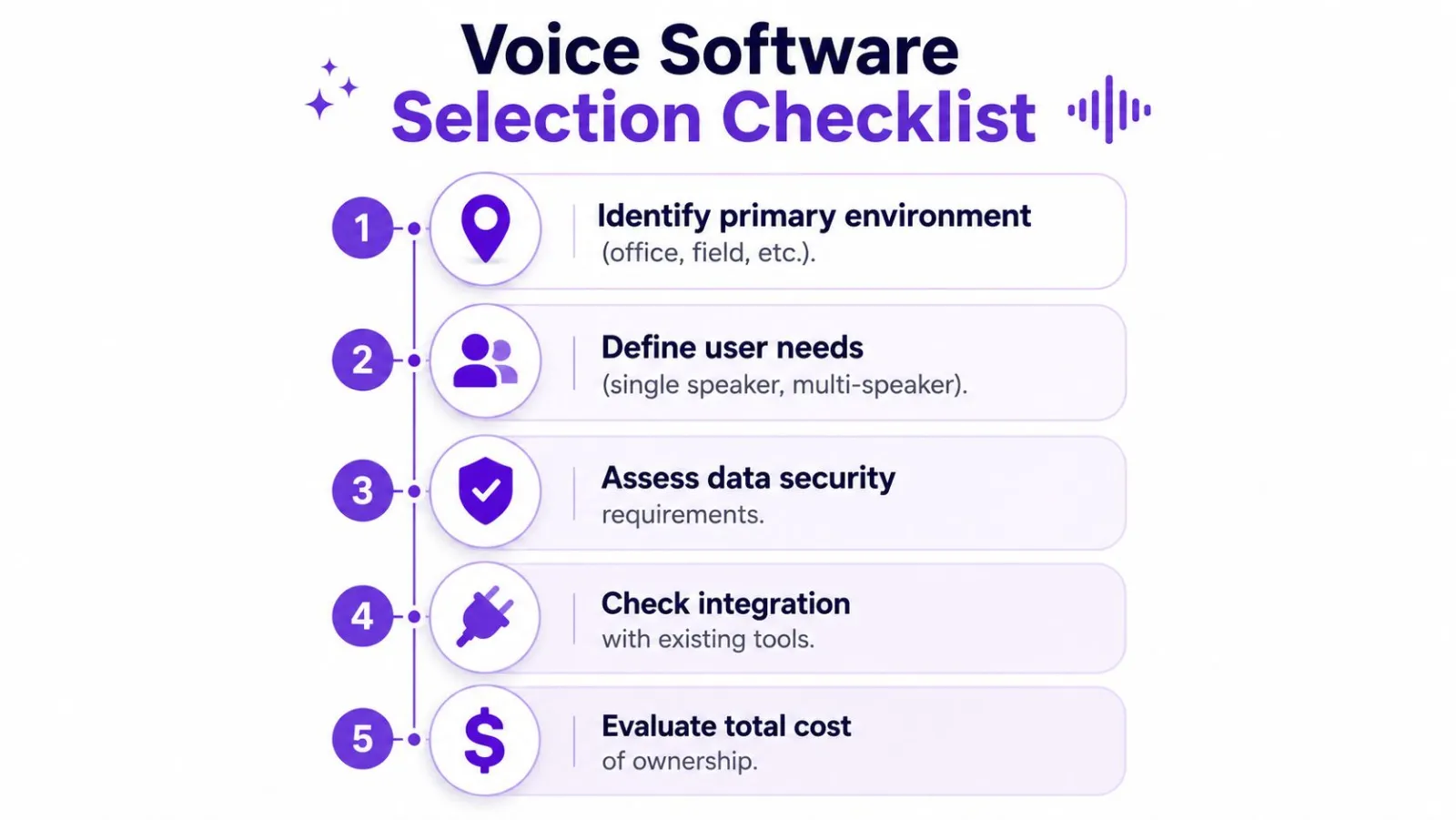
Start with your environment, not a product list. A quiet home office, shared workplace, moving vehicle, and outdoor inspection site create different requirements even when the user speaks the same language.
Build a defensible shortlist
Use these questions before you compare features:
- Where will people speak? Test quiet rooms, shared offices, mobile settings, and field locations separately.
- How quickly must text appear? Live captions, conversational commands, and ordinary dictation have different latency needs.
- Does offline operation matter? If connectivity is unreliable or audio is sensitive, ask whether the product can work without sending recordings away.
- Who will use it? Test accents, dialects, multilingual switching, and more than one speaker.
- What terminology matters? Prepare a list of names, jargon, product terms, and technical phrases from your own work.
- Where must the text go? Confirm behavior in browsers, office apps, editors, terminals, and communication tools.
- What does the full cost include? Review subscriptions, usage charges, seats, hardware, administration, and any required integrations.
Ask vendors for a recorded demonstration using your own voice and vocabulary. A polished demo from a different speaker in a quiet room tells you very little about your workflow.
Run a focused trial
A short trial should compare the same paragraph in quiet and noisy conditions. Dictate technical terms from your field, include names and numbers, and measure how much editing each version requires.
Watch for red flags:
- Vague accuracy claims: A single score without language, noise, microphone, or test-condition details isn't enough.
- No meaningful trial: If you can't test your own voice, don't assume the demo represents your results.
- Unclear cloud charges: Confirm whether cost changes with minutes, users, model choice, or storage.
- No microphone guidance: A serious product should explain supported input devices and recommended setup.
- Weak correction tools: Fast editing, custom dictionaries, and visible changes can matter more than a small benchmark difference.
For a seven-day evaluation, repeat the same tests across several sessions, compare transcripts side by side, and record the corrections you make. Choose cloud deployment when you need broad coverage, advanced processing, or centralized integration. Choose local processing when privacy, offline access, or predictable handling is the controlling requirement.
Vibe Typer offers system-wide voice typing across Linux, Windows, macOS, and iOS, with support for 99 languages, automatic language detection, custom vocabulary, and text insertion into the active application. If you want to test a cross-platform dictation workflow with formatting and correction controls, visit Vibe Typer and evaluate it using your own voice, apps, and working environment.
Try Vibe Typer free
Voice typing that works in every app on Linux, Windows, and macOS. Free to download: 2,000 words a month, no card.
Download free