Speech to Text API: How It Works and What to Evaluate

You've been asked to add transcription to a customer-support app. A vendor dashboard promises impressive accuracy, the first demo looks clean, and the integration seems straightforward. Then the actual recordings arrive. Customers speak with different accents, two people talk at once, a keyboard rattles near a cheap microphone, and product names turn into nonsense.
That gap between a polished benchmark and a messy production stream is where most speech-to-text projects succeed or fail. A speech-to-text API is a production dependency, and it is more than a model that converts sound into words. It carries decisions about audio quality, latency, language coverage, speaker separation, privacy, cost, retries, and how the resulting text reaches the user.
Table of contents
- Why speech to text APIs matter now
- How speech to text APIs process audio
- Key features to evaluate before choosing
- The benchmark accuracy trap
- Batch transcription versus real-time streaming
- Privacy and compliance in production deployments
- Building your evaluation checklist
Why speech to text APIs matter now
Speech recognition has moved a long way from constrained command systems. Bell Labs' Audrey, introduced in 1952, could recognize digits spoken by a single voice, while IBM's Shoebox in 1962 understood 16 English words. By 2001, speech recognition had reportedly reached close to 80% accuracy, and later research systems pushed word error rates into single digits, including IBM's 6.9% in 2016, Microsoft's 5.9% in 2017, IBM's later 5.5%, and Google's claimed 4.9%, as documented in this history of speech recognition.
Those milestones explain why speech-to-text APIs now sit underneath meeting notes, subtitle generation, call analytics, accessibility features, fraud detection, and conversational AI. The market has also commercialized quickly. One estimate placed the speech-to-text API market at $2.2 billion in 2021, projecting $5.4 billion by 2026, a 19.2% CAGR across that span, while another outlook estimated $3.8135 billion in 2024 and forecast $8.5694 billion by 2030, a 14.4% CAGR from 2025 to 2030 (MarketsandMarkets).
The production problem is audio, not the demo
A support application may receive phone-quality audio, headset recordings, mobile microphones, conference-room spill, interruptions, and code-switching. A vendor benchmark can still be useful, but it can't answer the question you have: will this API produce usable text from our users, in our environment, with our vocabulary?
Teams also need to choose the right delivery model. A batch endpoint makes sense for recorded calls or media libraries. A streaming endpoint is necessary when text must appear while someone is speaking. For Linux users, the final mile matters too. A recognition service can return an excellent transcript and still create a poor experience if text insertion fails in the active application, especially across native Wayland, X11, terminals, and editors.
For background on the underlying concept, DocsBot's speech-to-text explained resource is a useful starting point. Teams comparing server processing with local approaches can also review on-device speech to text, particularly when data handling and offline behavior influence the architecture.
How speech to text APIs process audio
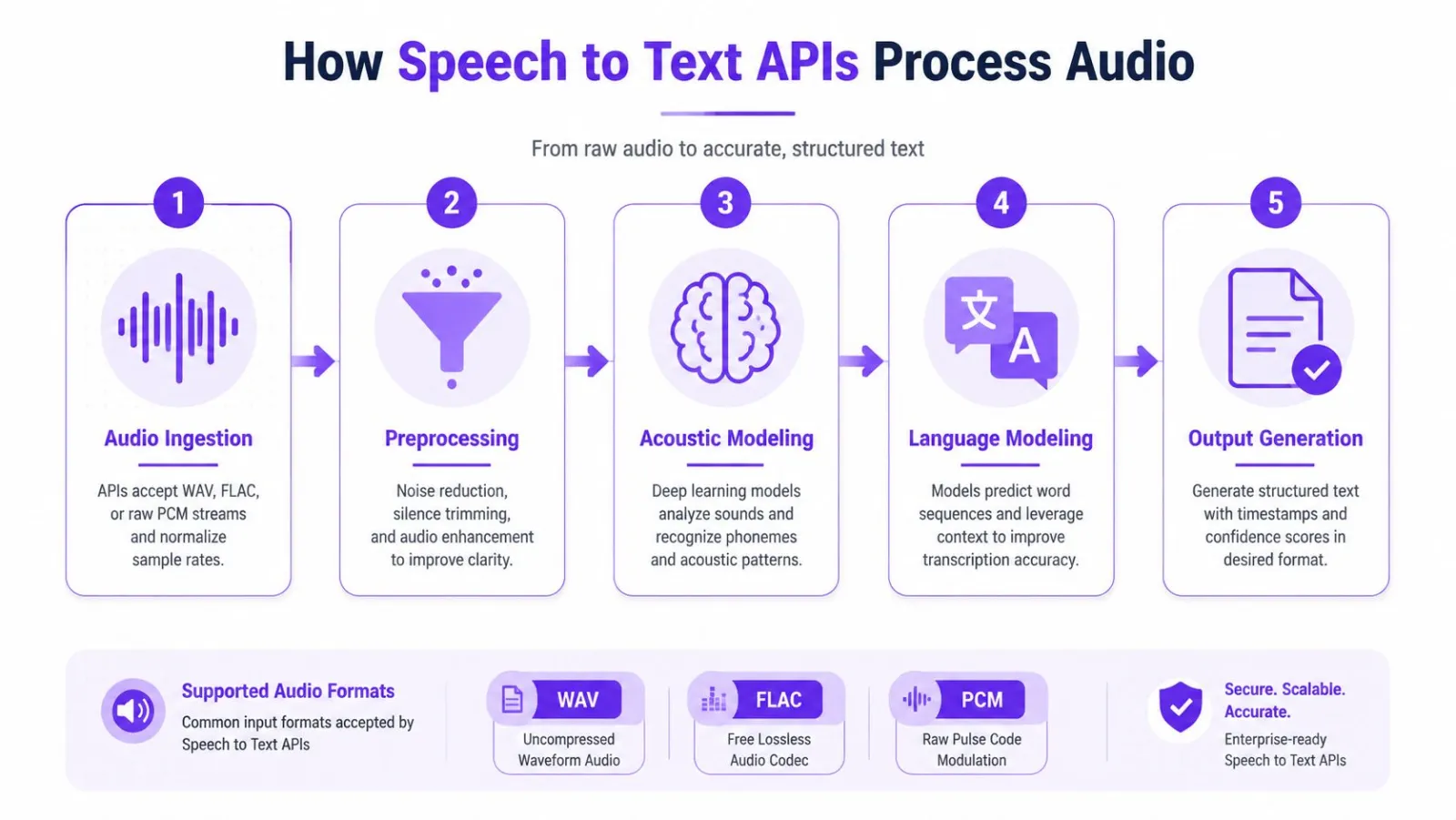
A speech-to-text API turns an audio stream or file into structured output through a sequence of transformations. The exact architecture varies, but the practical pipeline usually looks like this:
Audio ingestion and preprocessing
The API first accepts an audio file or stream. Common inputs include WAV, FLAC, and raw PCM, although support differs by provider. The service may normalize sample rates, convert channels, decode the audio, and divide the signal into manageable windows.
Preprocessing can include silence trimming, voice activity detection, filtering, and noise handling. Don't assume that preprocessing always improves results. Aggressive noise reduction can remove consonants, alter speech timing, or damage a recording that the model would have handled correctly. Test the original audio and the processed version instead of adding a filter because it looks helpful in a diagram.
Acoustic and language interpretation
The next stage extracts patterns from short audio frames. Traditional systems represent those patterns with spectrograms or mel-frequency cepstral coefficients, commonly called MFCCs. The acoustic model then maps sound patterns toward phonemes and words.
A useful analogy is translation. The acoustic model acts like a phonetic dictionary, identifying what sounds are present. The language model supplies grammar and context, helping resolve phrases that sound similar, such as "recognize speech" and "wreck a nice beach." The decoder combines those possibilities and searches for a plausible sequence of words.
Practical rule. Never evaluate a transcript only by reading the final paragraph. Inspect timestamps, confidence values, partial revisions, speaker labels, and the raw events your application receives.
Beam search is one decoding strategy used to keep several likely interpretations alive while limiting computation. A wider search can improve choices in ambiguous audio, but it can also increase processing cost and delay. A narrower search responds faster, yet may commit too early to the wrong phrase.
End-to-end neural models
Modern systems such as Whisper and Conformer-based models can collapse several traditional stages into a single neural architecture. That simplifies the conceptual pipeline and can reduce latency in some deployments, but the computational burden still exists somewhere, either in the provider's infrastructure or in your own hardware.
The invoice for a speech-to-text API covers more than neural inference. It may include audio decoding, stream management, language detection, partial result delivery, timestamps, formatting, diarization, storage, and operational reliability. Before sending production audio, resolve format and capture problems with this guide to audio input issues. For teams improving their recording process, this practical guide to improve transcription accuracy is also relevant.
Key features to evaluate before choosing
A production-ready API has to fit the whole pipeline. A clean transcript from a sample file proves little. Start with accuracy, but define accuracy in terms of the errors your product can tolerate.
Word error rate, or WER, counts substitutions, insertions, and deletions against a reference transcript. Character error rate, or CER, can be more useful for names, identifiers, and languages where word boundaries behave differently. Always record whether the test uses clean, noisy, accented, multi-speaker, or domain-specific audio.
Measure speed at the client boundary
Streaming latency has several meaningful milestones:
- First partial: when any tentative text arrives.
- First usable partial: when the application can act on the result.
- Final committed text: when revisions should stop.
Benchmarking guidance recommends measuring at the client boundary and reporting percentiles such as p50 and p95, because model processing time alone hides network delay and revision churn. In voice-agent systems, the STT layer often has only about 150 to 300 milliseconds when the complete speak, listen, and reply loop must remain under roughly 800 milliseconds (Deepgram latency benchmarking guidance).
A 2026 benchmark illustrates the trade-off. Deepgram Flux delivered partial and final transcription times of about 0.019 seconds and 0.020 seconds, respectively, with 7.36% WER. ElevenLabs Scribe v2 Realtime reached 3.64% WER with 0.14-second final-after-end-of-speech latency, while Cartesia Ink-2 reached 3.59% WER with 0.21-second latency (Artificial Analysis streaming benchmark). Those results don't identify one universal winner. They show why you must score latency, accuracy, and revision stability together.
Check the capabilities that change the product
Speaker diarization identifies who spoke when. It matters for meetings, interviews, and call analytics, but it can become unreliable when voices overlap or recordings contain multiple channels with inconsistent routing.
Custom vocabulary, phrase weighting, pronunciation hints, and domain adaptation can protect brand names, technical terms, medical language, and internal abbreviations. Language coverage also requires testing. A provider may list broad multilingual support while delivering uneven quality across dialects or lower-resource languages. One industry roundup reports 2.1% WER on LibriSpeech clean, 4.6% on LibriSpeech other, and 4.4% on FLEURS-en, while describing the model as strongest in English and covering 30+ languages (Inworld speech-to-text API overview).
| Feature | What to measure | Production threshold |
|---|---|---|
| Accuracy | WER, CER, critical-token errors, confidence behavior | Set from your user workflow |
| Latency | First partial, usable partial, final text, p50, p95 | Match the interaction design |
| Languages | Accent, dialect, code-switching, language detection | Validate with representative users |
| Diarization | Speaker labels, overlap handling, channel behavior | Test actual conversation patterns |
| Customization | Vocabulary, phrase weighting, pronunciation support | Confirm required terms are configurable |
| Reliability | SLAs, rate limits, retries, webhooks, reconnects | Define failure behavior before launch |
| Cost | Per-minute, per-request, tiered pricing, add-ons | Calculate total workflow cost |
Pricing can be usage-based, request-based, tiered, or a combination. Hidden costs often come from premium diarization, custom models, storage, retries, preprocessing, and downstream processing. For a concrete output example, Captapi's video transcript example helps clarify the difference between raw text and a transcript that includes useful structure. Keep your language and dialect test cases beside the provider's documented supported languages.
The benchmark accuracy trap
A vendor's WER is a measurement, not a promise. It usually reflects a defined dataset, recording setup, language, annotation policy, and decoding configuration. Change the microphone, speaker, room, vocabulary, or conversational style, and the result changes.
Clean read speech is the most deceptive. Production audio contains accents, crosstalk, interruptions, clipped samples, room echo, background music, typing, and domain terms that don't appear in general-purpose evaluation sets. A benchmark may tell you how two systems compare under the same conditions, but it won't tell you whether either system understands your customers.
Build a representative test harness
Collect recordings that reflect the product, then create careful reference transcripts. Include short commands, long explanations, proper nouns, numbers, email addresses, product names, hesitations, corrections, and code-switching. If your application handles multiple speakers, include overlap rather than removing it from the test set.
The benchmark should measure both broad and business-specific outcomes:
- Overall WER: Compare the complete transcript with a human reference.
- Critical-token accuracy: Score names, identifiers, prices, commands, and terms separately.
- Usable-text rate: Check whether the transcript requires manual correction before the next workflow step.
- Revision stability: For streaming, count how often displayed words change after the interface has acted on them.
- Confidence usefulness: Verify whether low-confidence output identifies text that needs review.
A system can have a respectable aggregate WER and still fail the product if it consistently misrecognizes the one phrase that triggers an account action. Conversely, a slightly weaker general score may be acceptable when your application only needs rough search indexing.
| Audio condition | Vendor benchmark WER | Real-world WER | Primary failure mode |
|---|---|---|---|
| Clean read speech | Usually the headline figure | Measure locally | Dataset does not represent users |
| Accented speech | May be absent or separated | Test by accent and language | Phonetic variation |
| Background noise | Often controlled | Test realistic noise | Consonant loss and masking |
| Crosstalk | May be excluded | Include overlapping speakers | Speaker attribution and omissions |
| Low-quality microphone | Rarely emphasized | Test phones, headsets, and laptops | Clipping, echo, and bandwidth |
| Domain vocabulary | Generic terms dominate | Add product-specific phrases | Substitutions and invented words |
Don't treat confidence scores as truth. They're model signals, not proof that a word is correct. Use them to prioritize review, combine them with critical-token rules, and inspect the audio whenever an important decision depends on the transcript.
Batch transcription versus real-time streaming
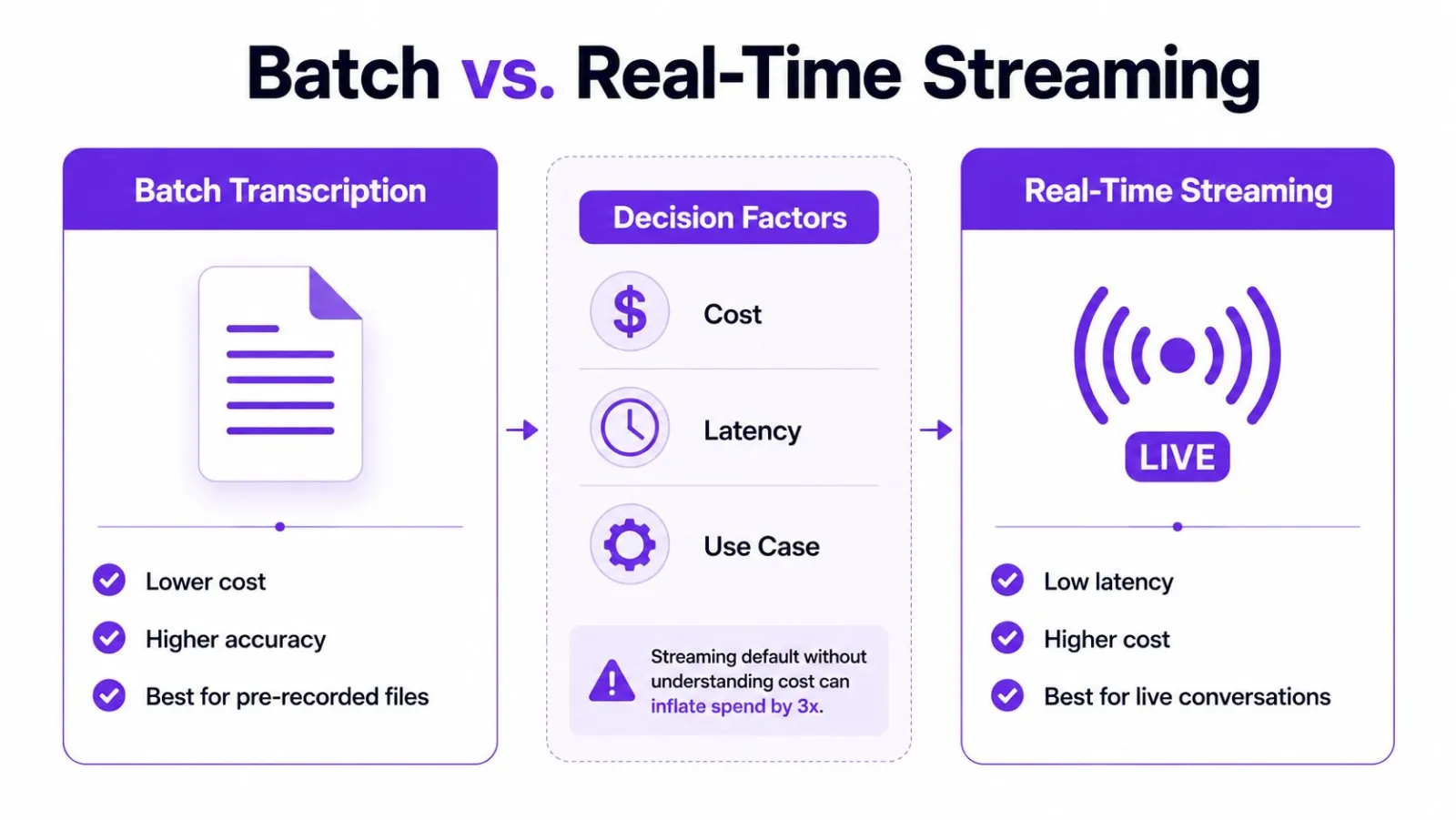
The architectural choice between batch and streaming affects user experience, error handling, infrastructure, and cost. It should follow the moment when your application needs text, not the assumption that real time is automatically more advanced.
Batch transcription accepts a completed file, processes it asynchronously, and returns the result through polling or a webhook. It suits recorded meetings, voicemail, podcasts, media archives, and post-call analysis. The service can use the full recording context, while your application avoids maintaining a live connection.
Streaming transcription sends audio over a persistent connection, commonly a WebSocket, and receives partial and final results as speech arrives. It's required for live captions, voice typing, voice assistants, agent assist, and any interface where waiting for the recording to end would break the interaction.
Compare the operational burden
Batch systems need durable file storage, job state, webhook verification, polling fallbacks, and idempotent processing. Streaming systems need connection lifecycle management, backpressure handling, reconnect logic, audio chunk timing, partial result reconciliation, and clear rules for when text becomes final.
Streaming also exposes a subtle failure mode: revision churn. A partial transcript may change as the model receives more context. If your interface inserts every partial directly into a document, users will see duplicated words, deleted phrases, or cursor jumps. Keep tentative text separate from committed text and reconcile updates by segment identifiers or timestamps.
| Decision factor | Batch | Streaming |
|---|---|---|
| User feedback | Delayed until processing completes | Immediate partial and final events |
| Best fit | Recorded files and archives | Live interaction and captions |
| Failure handling | Retry a job or file | Reconnect without losing state |
| Context | Full recording available | Limited future context |
| Product complexity | Workflow and job management | Connection and revision management |
| Cost profile | Often easier to forecast | Long-lived connections and live processing |
A hybrid design often works well. Show a streaming transcript during a call, then run a batch pass for the archival version, search index, or downstream analysis. Keep the two outputs distinct so the UI's low-latency text doesn't become the permanent record without review.
Watch the following overview for a visual comparison of the two integration patterns:
Privacy and compliance in production deployments
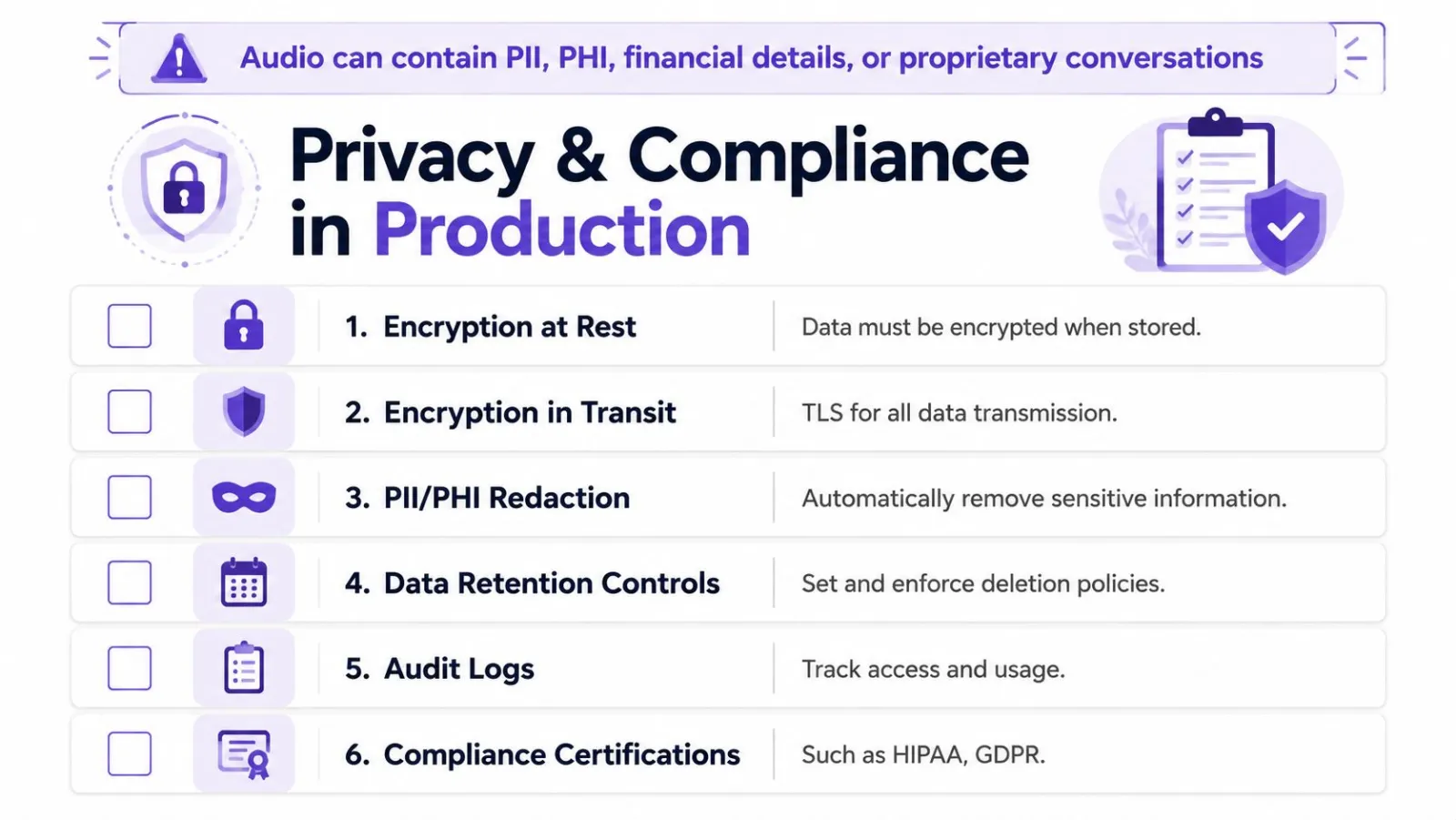
Audio can contain personally identifiable information, protected health information, financial details, confidential business conversations, and authentication material. Treating transcription as an ordinary text-processing call creates avoidable risk because the raw audio may be more sensitive than the transcript.
Start by classifying each stream. Document where audio is captured, where it travels, which provider processes it, where transcripts and logs reside, who can access them, whether the vendor uses data for training, and how deletion requests work. A certification can support due diligence, but it doesn't replace a review of the actual data-processing terms and subprocessors.
Encrypt, restrict, and audit
A compliance-focused guide recommends TLS 1.3 in transit and AES-256 at rest, along with least-privilege access controls and automatic key rotation (Deepgram compliance guidance). Detailed request logs should record the user, timestamp, data class, and redaction status so an auditor can understand who accessed what and why.
Retention needs a written rule rather than a default bucket policy. The same guidance gives framework-specific examples: SOC 2 requires one year, HIPAA recommends six, and GDPR requires only what is necessary, often 30 days. These references aren't interchangeable legal advice, so involve counsel and map the policy to your jurisdiction, contract, and data category.
Design deletion and consent into the workflow
Use consent language that matches the recording context. Redact or avoid collecting sensitive fields where practical, and make deletion automatic instead of relying on someone to remember a manual cleanup step. If the provider cannot meet your residency, retention, encryption, or contractual requirements, don't compensate with a more elaborate application layer. Choose an architecture that fits the data.
For regulated deployments, assess regional processing, private connectivity, private cloud or self-hosted options, breach notification terms, access logs, and business associate or data-processing agreements. The question isn't whether a vendor uses reassuring security language. The question is whether your team can demonstrate the complete path from microphone to deletion.
Building your evaluation checklist
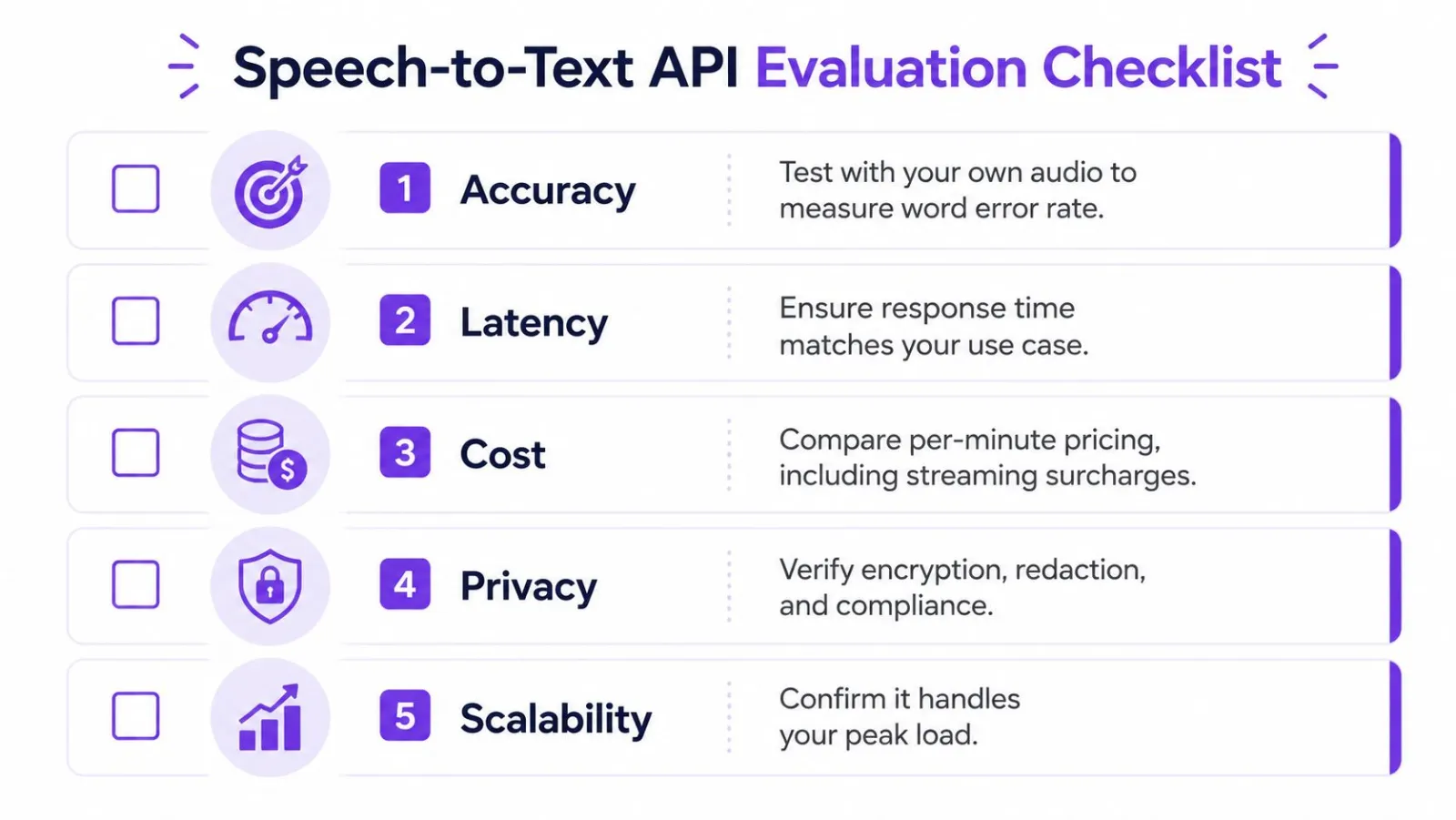
Turn the decision into a scored proof of concept. Use real audio, not sanitized samples, and assign weights based on the consequence of failure.
- Accuracy: Test accented speech, background noise, crosstalk, and domain vocabulary. Measure WER, CER, and critical-token accuracy.
- Latency: Record first partial, usable partial, and final text at the client boundary. Include p50 and p95 behavior.
- Integration: Choose batch, streaming, or a hybrid pattern according to when the product needs text.
- Privacy: Verify encryption, retention, redaction, residency, access controls, and vendor data-use terms.
- Scalability: Confirm rate limits, concurrent streams, retries, webhooks, and peak-load behavior.
Start with a small proof of concept using representative recordings and a defined acceptance score. Then expand the test set before signing a production contract, because no provider will dominate every category. Track accuracy, latency, failures, corrections, and total operating cost after launch. The best choice is the one that fits your users' audio and your team's operational limits, not the one with the most attractive dashboard number.
Vibe Typer does voice typing across Linux, Windows, macOS, and iOS. It sends transcribed speech into whichever app the cursor is in, supports 99 languages, custom vocabulary and hotkey recording, and processes audio in memory with no server-side transcript retention. See Vibe Typer if a finished dictation client is a useful reference point for your own evaluation.
Try Vibe Typer free
Voice typing that works in every app on Linux, Windows, and macOS. Free to download: 2,000 words a month, no card.
Download free