What an AI Writing Assistant Actually Does in 2026

You've got a half-written email open, a document with three abandoned sentences, or a message thread you keep reopening because the reply feels harder to type than it should. The ideas are already in your head. The friction sits between thinking and producing clean text.
An AI writing assistant can reduce that friction. The useful version isn't a chatbot that generates paragraphs from prompts. It works more like a drafting loop. You speak or type an idea, the system captures it, removes mechanical clutter, and reshapes the result for the context in front of you. The meaning and the final approval stay with you.
Table of contents
- The moment an AI writing assistant steps in
- How an AI writing assistant actually works
- Core features that show up again and again
- Pairing voice typing with an AI writing assistant
- AI rewrite and reply commands in practice
- Accuracy, privacy, and trust questions worth asking
- How to choose the right AI writing assistant
- Putting the whole loop together
The moment an AI writing assistant steps in
The most valuable intervention often happens before you ask for a finished paragraph. You might know exactly what you want to say about a delayed project, a customer question, or a technical decision, yet struggle to turn that thought into an orderly message. An AI writing assistant carries part of the mechanical load while you keep control of the substance.
Older writing aids usually handled one narrow task. Autocorrect fixed individual words. Templates supplied predictable structures. A grammar sidebar marked possible mistakes after you had already typed the passage. Modern systems can combine those functions with speech capture, context-aware cleanup, rewriting, and direct insertion into the application where you're working.
Practical rule: Treat the assistant as a drafting partner, not an authority on what you mean.
That distinction changes how you use it. Instead of opening a separate chat window and explaining the entire situation, you can select text, copy a conversation, dictate a rough thought, or give a short voice instruction. The assistant uses that immediate context to produce a version suited to the task.
The loop starts with intent
A useful workflow has several small passes:
- Express the thought. Speak naturally or type a rough draft without stopping to perfect every sentence.
- Clean the material. Remove fillers, repair punctuation, correct obvious errors, and preserve important names or terminology.
- Shape the message. Ask for a shorter version, a friendlier tone, a direct reply, or a format appropriate to the current app.
- Review before sending. Check facts, names, commitments, and any sentence where a smoother rewrite might have changed your meaning.
A controlled study of an AI writing assistant used by EFL learners supports this narrow reading. Mean errors per 250-word essay fell from 14.2 before use to 8.5 afterward, a statistically significant result, t(59) = 8.42, p < .001 (study of the AI-powered writing assistant). The evidence concerns surface-level writing quality, especially grammar, punctuation, and spelling. It doesn't prove that an assistant supplies ideas or judgment.
The same pattern applies to everyday work. Let the system handle transcription and sentence mechanics, then use focused commands for the parts where context matters.
How an AI writing assistant actually works
Think of the system as a kitchen with three stations. Capture brings in the ingredients. Cleanup washes, trims, and sorts them. Rewrite turns the prepared material into a dish that suits the person eating it.
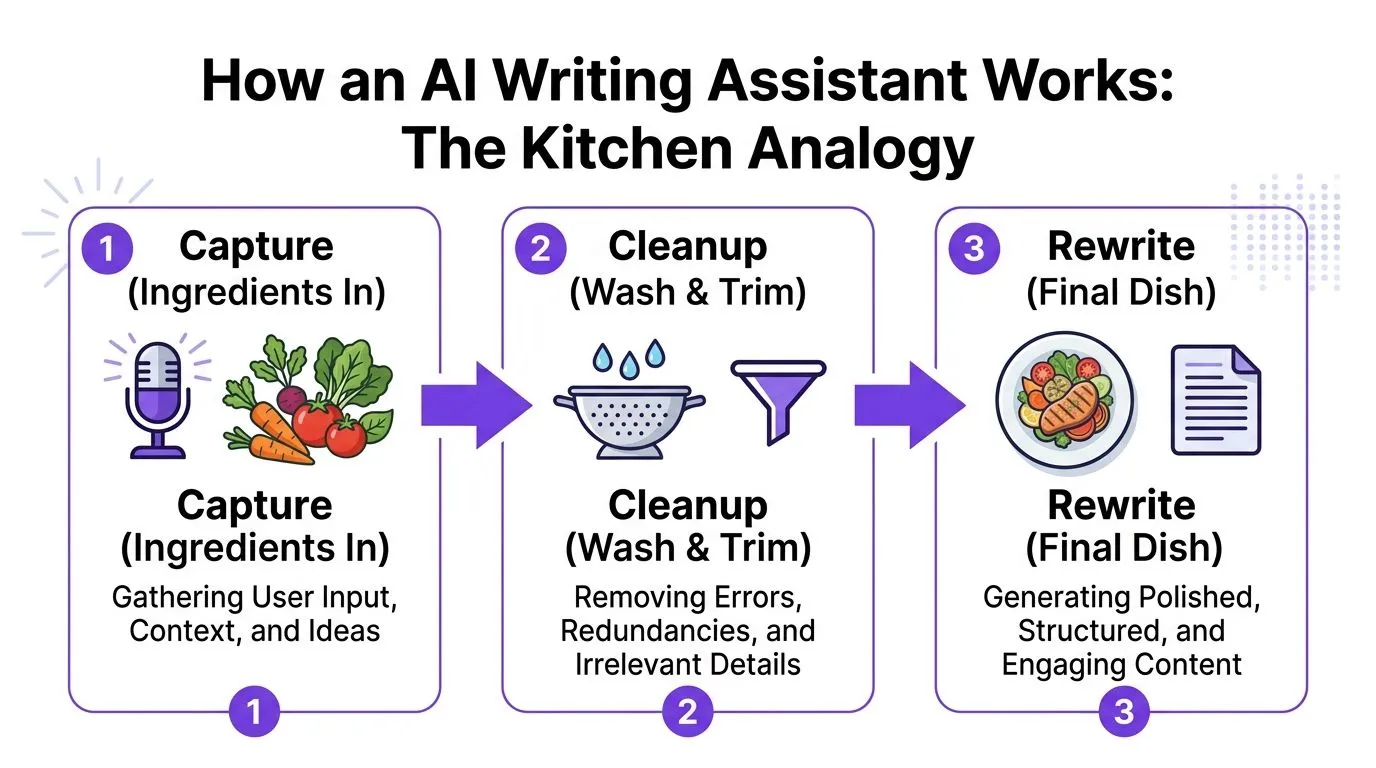
Capture brings in the raw material
Speech capture converts audio into a text draft. A recognition model listens for words, separates pauses from speech, and produces a transcript. Keyboard input, clipboard content, selected text, and imported files can enter the same workflow through different doors.
Language coverage varies. OpenAI's Whisper supports transcription in 99 languages and translation into English, according to documentation about how Whisper works. Meta's Omnilingual ASR release describes support for more than 1,600 languages (coverage of Meta's Omnilingual ASR release). Language support is a number you can check, so check it rather than reading the marketing line.
Cleanup prepares the text
Raw speech rarely arrives as polished prose. Cleanup can remove words such as "um" and "like," apply punctuation, join broken phrases, honor spoken corrections, and format the output. The system may also use a custom dictionary so names, product terms, and specialist vocabulary survive transcription.
Processing can happen locally, in the cloud, or through a split design. A local model may handle audio on the device, while a remote language model performs a more advanced rewrite. That distinction matters because each stage can create a different privacy boundary.
Rewrite plates the final version
Rewrite uses an instruction and available context to reshape prepared text. "Make this concise" asks for compression. "Turn this into a friendly reply" changes the structure and social tone. "Format this as an agenda" changes the presentation.
An overview of speech-to-text APIs covers the capture layer, but an AI writing assistant becomes more useful when capture, cleanup, and rewrite remain connected. Every feature in the next section belongs to one of those three stations, whatever name a product gives it.
Core features that show up again and again
Feature lists are easier to compare when you group them by the job they do. Some are now basic expectations. Others still differ a lot between products.
A comparison of feature clusters
| Cluster | What it does | Examples |
|---|---|---|
| Input | Brings words into the workflow | Voice capture, clipboard context, selected text, file import |
| Cleanup | Converts rough material into readable text | Filler removal, punctuation, spelling repair, formatting, tone preparation |
| Control | Lets the user steer recurring behavior | Custom prompts, dictionaries, vocabulary, per-app profiles |
| Privacy | Defines how content is processed and retained | On-device mode, redaction, retention controls, vendor routing choices |
Input is the foundation. A product may accept speech through a hotkey, selected text through a command, or a copied email through a reply action. Cross-app insertion is especially important because an assistant that works only inside one browser tab creates a new context-switching problem.
Cleanup determines whether the output is ready to use. Removing filler words is helpful, but preserving a person's intended meaning matters more. Look for punctuation control, correction handling, formatting rules, and a way to inspect substantial changes.
Control separates a one-off novelty from something you'd use every day. A custom dictionary can protect names and jargon. Saved instructions can make every dictated note follow a preferred style. Per-app profiles can tell the system to produce plain text in a terminal, structured prose in an email client, or code comments in an editor.
Privacy deserves equal billing with convenience. On-device processing, redaction, retention settings, and clear vendor routing determine whether sensitive drafts enter an external system. These features vary widely, so don't infer them from a general statement that a product is "secure."
A good checklist asks four questions. How does text enter? How is it cleaned? How much control do I have? Where does the content go? Those tell you more than a long catalogue of branded features.
Pairing voice typing with an AI writing assistant
A practical dictation session starts with a system-wide hotkey. You press or hold it inside an email client, document editor, terminal, or chat application. The assistant captures your speech, then returns text to the field that already has the cursor.
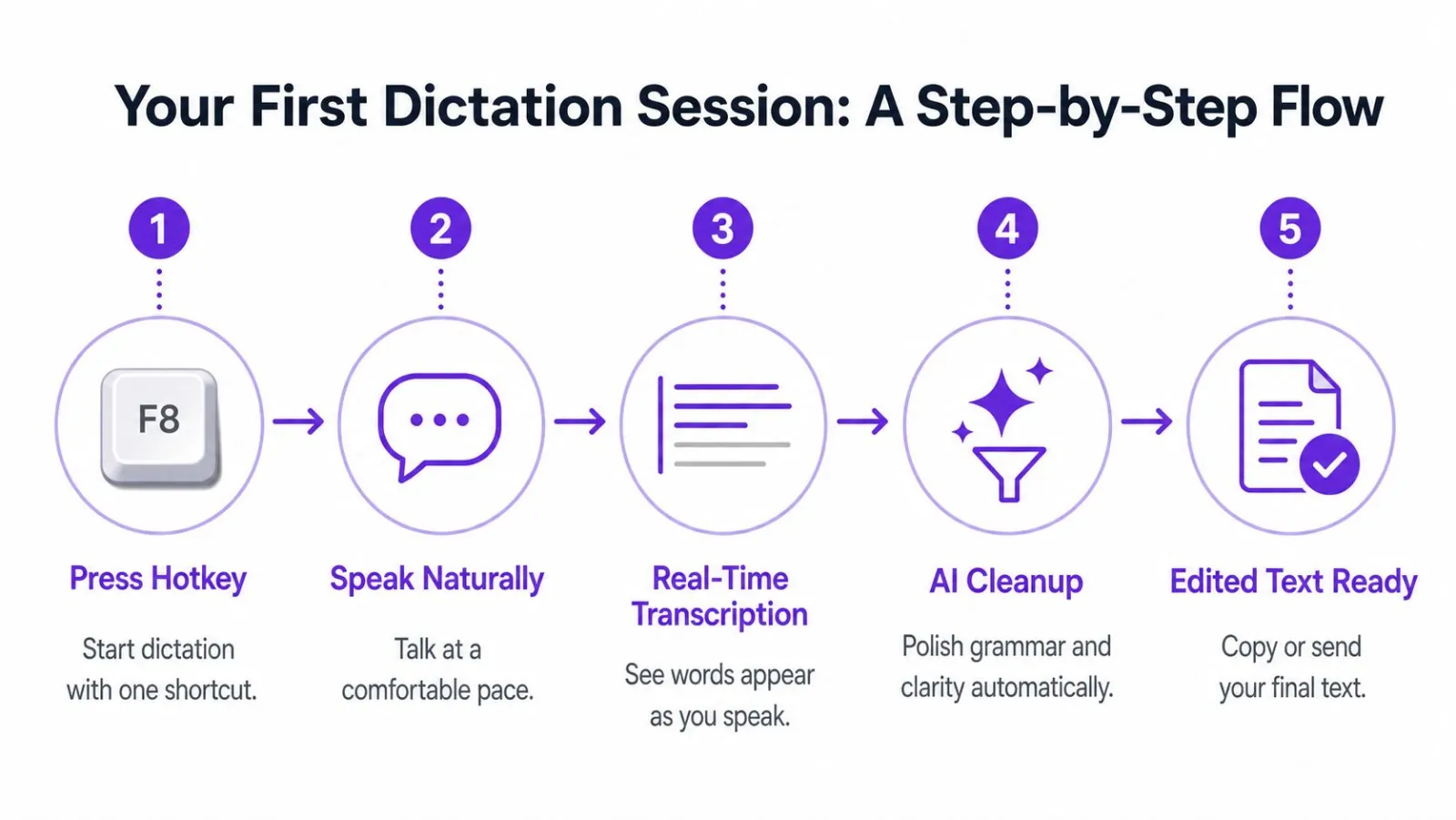
Suppose you say, "I'm sorry um the review is taking longer than expected like can we move it to Thursday question mark." A capture layer produces the rough words. Cleanup removes the fillers, applies the question mark, and returns something closer to: "I'm sorry, the review is taking longer than expected. Can we move it to Thursday?"
The application changes the output
The same spoken input can require different insertion behavior:
- Email reply. Plain, readable prose with a greeting if you asked for one.
- Document. Headings, paragraphs, or a bulleted agenda.
- Terminal or code editor. Plain text without rich formatting that could interfere with commands or comments.
A per-app profile supplies those rules so you don't repeat them every time. The loop stays continuous. Speak, pause, inspect the cleaned draft, correct a word by voice, and continue from the active cursor.
Research on speech-to-text supports the productivity case, but it also explains why recognition quality matters. One intervention study reported that 7 of 8 students increased text productivity. Another found about 53% more words with speech-to-text than keyboarding, 73.65 words against 48.17 (speech-to-text intervention research). The lesson isn't that voice always wins. Output speed improves when recognition friction stays low and accuracy holds during editing.
The guide to voice input for computers explains why system-wide activation matters. If you must copy a transcript into another app, repair formatting, and then paste it back, the assistant has only moved the work around.
AI rewrite and reply commands in practice
Rewrite commands become useful when they can see the text you mean, not just a general topic. Selected text or clipboard content gives the assistant a concrete starting point, so your instruction can stay short: "make this more direct," "turn this into one paragraph," or "write a friendly reply."
Consider a rough spoken message about a missed deadline:
"I know I said I'd have the draft ready yesterday, but I got pulled into the customer issue and then the numbers needed another check, so I don't want to send something incomplete. I should be able to get it over tomorrow afternoon if that still works."
With the text selected, a command such as "rewrite for Slack, concise and empathetic, propose tomorrow afternoon" can produce a shorter message that acknowledges the delay and states the new timing. The user still needs to confirm that the proposed date is accurate.
Context makes replies less generic
A second example starts with a defensive email draft explaining every reason a launch moved. Select the draft and ask for "a three-sentence reply, lead with the answer, put caveats last." The result should prioritize the decision, then retain only the qualification needed for the recipient to understand it.
Small controls make a large practical difference:
- Tone presets. Direct, friendly, formal, or neutral.
- Length targets. Shorter, one paragraph, or concise reply.
- Reusable instructions. Saved snippets for recurring formats and house style.
- Context source. Selected text, clipboard content, or the active conversation.
These controls don't replace judgment. They make it faster to act on. For automated responses and message context, PostSyncer auto response is a related reference point.
Accuracy, privacy, and trust questions worth asking
Convenience doesn't answer the questions that determine whether you can use an assistant responsibly. Ask who receives the audio, whether the transcript is retained, what happens when the system mishears a name, and whether the contract clearly defines ownership of the resulting text.
Accuracy needs a review step
Speech recognition can struggle with names, jargon, accents, background noise, and mid-sentence corrections. A rewrite can create a different problem by making a sentence sound smoother while subtly changing its meaning. Read back messages before sending them, especially when they contain commitments, figures, technical terms, or sensitive decisions.
Privacy needs specific controls
Look for concrete safeguards rather than broad assurances:
| Concern | Concrete safeguard |
|---|---|
| Audio exposure | On-device transcription or clearly documented processing boundaries |
| Transcript retention | A defined retention window, with an option to set storage to zero where available |
| Vendor access | Clear statements about logs, training use, and who can process submitted text |
| Stored files | Encryption in transit and at rest, plus customer-controlled storage where offered |
| Sensitive content | Redaction tools and rules that prevent confidential text from entering remote models |
Microsoft's Azure documentation states that real-time speech input is processed in server memory and isn't stored at rest, while batch transcription allows customers to control storage location and retention of audio and output files (Azure speech-to-text data privacy documentation). That's the level of specificity buyers should expect from any vendor.
A 2025 U.S. survey found that 30% of people who avoid AI cited privacy concerns, 38% said they don't trust AI assistants, and 53% saw no need for them (2025 U.S. AI survey). Those figures describe adoption barriers, not proof that every assistant handles data poorly.
The on-device speech-to-text explanation shows what local processing changes. Ownership also belongs in the checklist. Your words should remain yours, exports should be portable, and the agreement should explain retention, training, access, and deletion in plain language.
How to choose the right AI writing assistant
A useful test starts with a real workday. Dictate a message near ordinary background noise, clean the transcript, rewrite a paragraph, and insert the result into its destination. A tool may offer each capability yet still create friction through poor insertion or delay.
Use this decision checklist
- Test noisy environments. Try speech capture outside a quiet room. Check names, technical terms, and pauses.
- Compare speed with accuracy. Track how many corrections you make per minute of speech. If you spend more time fixing than drafting, the tool is adding friction, not removing it.
- Inspect the processing model. Identify which stages run on the device and which send content to a cloud service. Review retention and training policies instead of relying on labels.
- Check context and insertion. Select text, copy a conversation, dictate into an email, and paste into a terminal. Confirm that formatting survives each destination.
- Review model transparency. Look for supported languages, correction behavior, dictionaries, and handling of uncertain recognition.
- Match the tool to your content. Short messages, code comments, and confidential team material call for different controls and editing behavior.
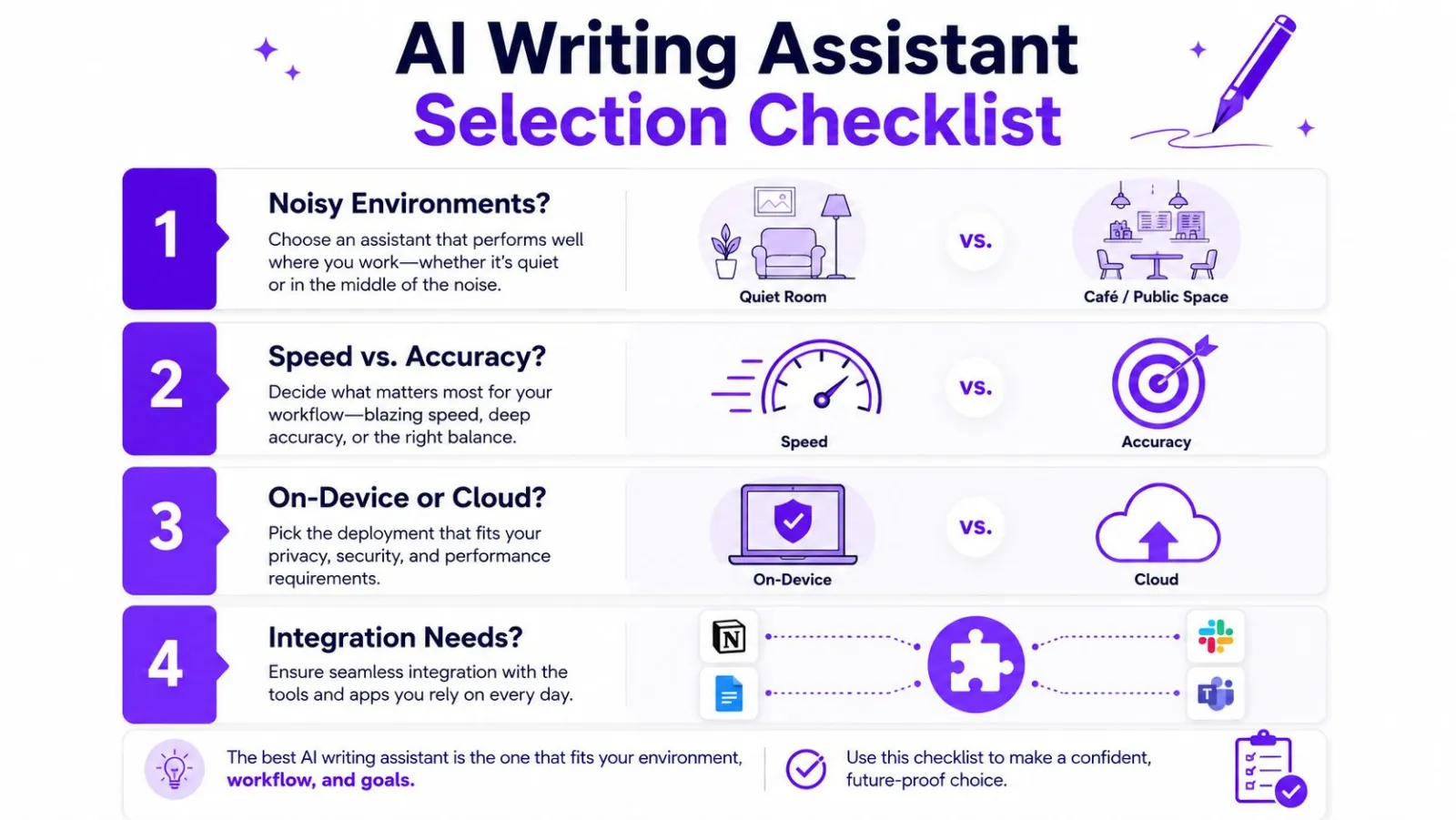
Integration often decides between otherwise similar products. An assistant that captures and cleans speech well but lacks rewriting may force you to move text into another app, issue a command, and reformat the output manually. A single drafting loop can reduce those handoffs, provided its privacy boundary and output quality fit your work.
Putting the whole loop together
The complete loop is simple to describe. Capture turns speech into text. Cleanup removes disfluencies, fixes mechanics, and applies formatting. Rewrite uses a short, scoped instruction to adjust clarity, length, tone, or reply structure.
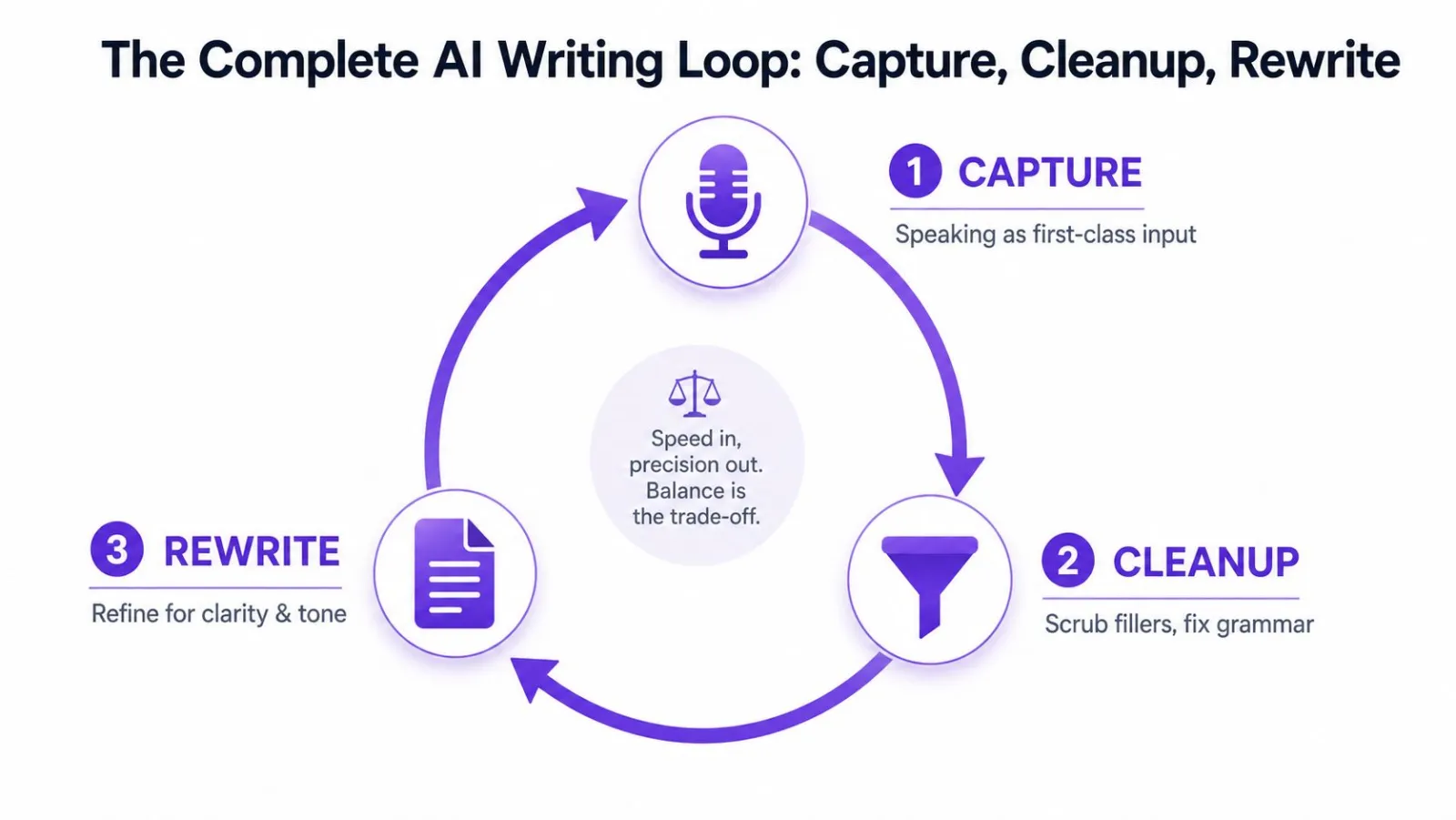
The trade-offs are real. There may be a pause between spoken intent and rendered text. Cleanup can misread a proper name or remove a phrase you wanted to keep. Cloud processing creates a trust boundary around transcripts, prompts, and drafts.
The next skill isn't finding a magic prompt. It's learning to speak in structured fragments. State the point, add the necessary context, name the action or decision, then pause. Clear input gives the cleanup stage fewer ambiguities and gives the rewrite stage material it can shape without inventing intent.
Vibe Typer combines system-wide voice capture with cleanup, custom style instructions, AI rewrite and reply commands, and direct insertion into the active application across Linux, Windows, macOS, and iOS. Visit Vibe Typer to try a drafting loop built around speaking, cleaning, and revising text where you already work.
Try Vibe Typer free
Voice typing that works in every app on Linux, Windows, and macOS. Free to download: 2,000 words a month, no card.
Download free