10 Microphones for Dictation: Best Picks for Every Setup


You're dictating at your desk when the laptop microphone catches the keyboard, the fan, and the room around you. Later, you move into a shared office, put on a headset, and discover that comfort matters as much as pickup quality. Then you switch from a document to a terminal or clinical application, where a reliable push-to-talk button and clean text insertion matter more than a long specification sheet.
The best microphones for dictation are chosen around that reality. Distance from your mouth, room noise, wearing comfort, connection type, hardware controls, and application compatibility usually matter more than generic recording features. This list compares ten options by how you use them: professional handhelds, headsets, desktop microphones, close-talk dynamic mics, and USB/XLR designs. For broader setup guidance, see this guide to record better meeting audio.
Vibe Typer is one voice typing app where Linux and Wayland support, system auto-mute, and per-app text insertion change which microphone makes sense. It captures speech in its app and inserts the text into whatever application has the cursor. Transcription is not local, so the microphone still needs to deliver a clean signal to the app and operating system you use.
Table of contents
- 1. Philips SpeechMike Premium Air SMP4000
- 2. Philips SpeechOne PSM6000
- 3. Nuance PowerMic 4
- 4. OM SYSTEM Olympus RecMic II RM-4015P
- 5. SpeechWare TableMike 6-in-1
- 6. Buddy DesktopMic 7G
- 7. Shure MV7+
- 8. Samson Q2U
- 9. Jabra Evolve2 75
- 10. Andrea PureAudio USB Array Microphone
- Top 10 dictation microphones, feature comparison
- Match the microphone to how you work
1. Philips SpeechMike Premium Air SMP4000
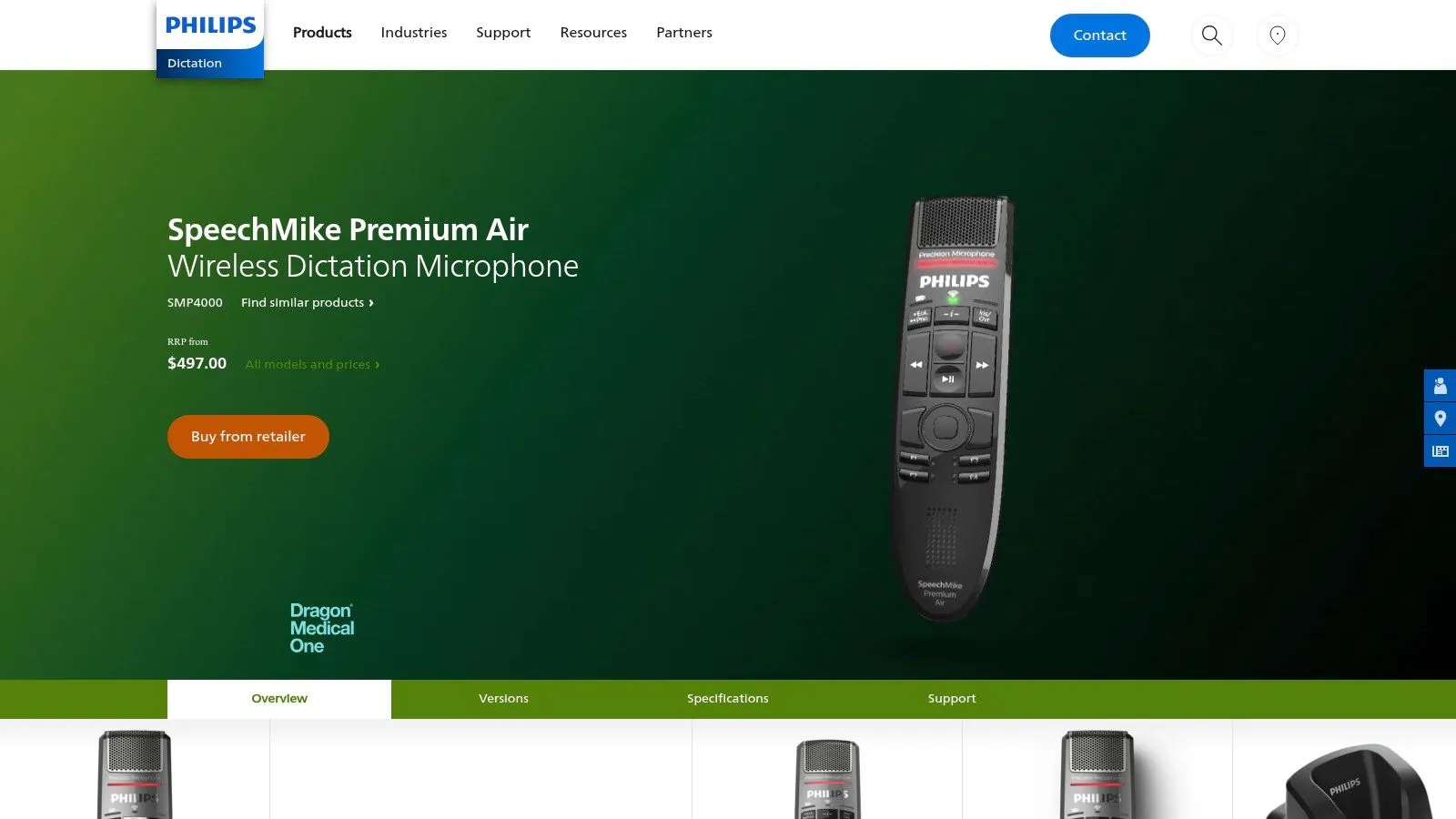
The Philips SpeechMike Premium Air SMP4000 is built for people who dictate for work all day rather than the occasional voice note. Its handheld shape keeps the capsule close to the speaker, while the decoupled microphone design separates the recording element from handling noise. That combination suits clinicians, lawyers, and other users who dictate into structured applications while navigating fields, templates, or records.
The wireless connection is Philips' proprietary 100% lossless speech transmission, rather than a typical compressed Bluetooth path. The device also adds a touch sensor for mouse control and programmable buttons, so your hand can move through an application without returning to the keyboard.
Where it earns its place
The main advantage is control. Push-to-talk reduces accidental recording, and the programmable buttons map to Dragon and clinical software. Philips positions the SMP4000 for Dragon and clinical integrations, so it is more relevant to people already using that software than to someone looking for a general-purpose USB microphone.
The wireless design also removes a cable from the hand without the compressed audio you get from most consumer wireless devices. You'll still need the dock or AirBridge, and this isn't the right choice for unrestricted walk-and-talk use across a large space.
Choose the SpeechMike Premium Air when close handheld control matters more than running on every platform.
The price and the Dragon focus are real drawbacks. If you dictate into a browser, a terminal, or a general voice typing app, verify button behavior and operating-system support before paying for professional integration. The recording modes and hotkeys documentation explains hold-to-talk and toggle recording, which helps when testing whether the microphone's buttons fit your software.
Visit Philips SpeechMike Premium Air
2. Philips SpeechOne PSM6000
The Philips SpeechOne PSM6000 is the headset version of the same idea. Its decoupled boom microphone uses triple-layer noise reduction, while the proprietary lossless 2.4 GHz connection sends speech to the computer without going through Bluetooth. That makes it a practical fit for clinicians and office users who dictate for long periods and need the microphone to stay at a consistent distance.
The headset supports multiple wearing styles and swappable cushions. Those details matter more than they may appear on a product page. A microphone that sounds good but becomes uncomfortable after a long session will eventually be left on the desk, while replaceable contact points are useful in shared or clinical environments.
Better for sustained dictation
The PSM6000's strongest argument is consistency. A boom that stays near the mouth gives speech-recognition software a more stable signal than a desktop microphone positioned several inches away. In moderately noisy spaces, the triple-layer noise-reduction design is aimed at keeping speech distinct from surrounding sound.
The dock includes a status light and remote, and the headset has programmable controls. They can start recording, mute, or trigger application-specific actions, although what they do depends on the software and operating system.
Its limitations are software support and range. The proprietary wireless link has a shorter stated range than some DECT or Bluetooth alternatives, and Philips' software favors Windows and Dragon. Linux users, and anyone on a cross-platform voice typing app, should confirm which buttons show up as usable controls rather than assuming every feature will transfer.
3. Nuance PowerMic 4
The Nuance PowerMic 4 makes sense when Dragon is where you spend your day. It's a USB handheld microphone with an integrated speaker, programmable buttons, and mouse-like controls designed for navigating fields in electronic health records and legal templates. Rather than competing with studio microphones, it concentrates on the physical actions that professionals repeat while dictating.
The device is mapped for Dragon Professional, Legal, and Medical, including version 16 and Dragon Professional Anywhere. Nuance lists a signal-to-noise ratio above 70 dBA and a frequency response from 20 Hz to 12 kHz in its product material, but those figures shouldn't be treated as a guarantee of identical recognition in every room or application. Placement, speech style, and environmental noise still shape the final transcript.
A Dragon-first purchase
The PowerMic 4's programmable controls are its reason to exist. If you spend the day moving through EHR fields, templates, or legal documents, keeping those actions on the handheld can reduce repeated keyboard and mouse movements. The familiar shape also suits users who prefer a microphone in the hand rather than a headset on the head.
Its weakness is platform support. Officially it is Windows-only and built around Dragon, so macOS and Linux users shouldn't buy it expecting the same integration. A generic USB audio path may be available in some setups, but that doesn't recreate Nuance's button mapping or application integration.
The microphone is only half the purchase. The other half is the software that understands its controls.
Availability and pricing can vary because the PowerMic 4 is commonly sold through resellers. Before ordering, verify the Dragon edition, operating-system requirements, and whether your organization's EHR configuration supports the desired button actions. For the software side of the decision, see this voice-to-text software guide.
4. OM SYSTEM Olympus RecMic II RM-4015P
The OM SYSTEM RecMic II RM-4015P is a sensible middle ground between a generic USB microphone and a specialized clinical handheld. Its two-microphone noise-cancelling system can adjust directionality, so it picks up the speaker and less of the room. The handheld design also keeps the capsule close to the mouth, which is usually easier for speech recognition than relying on a distant laptop microphone.
Programmable buttons and a hardware push-to-talk style make it suitable for forms, EHR entry, and other repetitive dictation tasks. The configuration utility runs on Windows and macOS and lets you remap the controls rather than accepting the factory layout.
Strong hardware, uneven platform experience
The RM-4015P works best when the physical device and vendor software are both part of the plan. Directionality helps in rooms where a close-talk microphone isn't convenient, and the ergonomic housing is intended for extended sessions. The buttons can be more valuable than a higher-end recording specification because dictation often involves starting, stopping, correcting, and moving between fields.
Linux users need to set expectations. The microphone may function as a generic USB audio and HID device, but vendor utilities and advanced configuration are platform-limited. That matters on Wayland, where what the device exposes depends on the compositor and input stack.
- For Windows and macOS: Use the configuration utility to map controls and apply supported updates.
- For Linux: Test basic audio input and generic button behavior before assuming vendor-level control.
- For forms and templates: Confirm that your dictation app can interpret the chosen buttons as hold-to-talk or toggle actions.
5. SpeechWare TableMike 6-in-1
The SpeechWare TableMike 6-in-1 is for users who want hands-free dictation without wearing a headset. Its long detachable boom can be positioned toward the speaker, and its normal and long-range modes give you more reach than a compact conference microphone. The design is still more deliberate than speaking toward a laptop, but it avoids the headband fatigue that can make a headset impractical.
SpeechWare includes integrated DSP with AGC and EQ under its VoiceMatic and SQ branding. The device also has touch controls for push-to-talk and push-to-lock, plus a built-in speaker for local playback. Those controls make it a desk appliance for dictation rather than just another microphone connected to a computer.
Desk distance changes the trade-off
A desktop microphone has to solve a harder acoustic problem than a close-talk handheld. The farther the capsule is from your mouth, the more room sound, keyboard noise, and reverberation reach the transcription engine. The TableMike's boom and voice-focused processing address that problem, but they can't eliminate the basic disadvantage of distance in a very loud room.
That makes it a good choice for a quiet or moderately controlled office, and a good fit if you want to sit upright, keep both hands free, and use hardware mute or lock controls without putting on a headset.
A far-field desk microphone is a comfort decision first, and an acoustic decision second.
Stock availability can fluctuate, and the store commonly lists pricing in euros. Check the current configuration and connection requirements directly before buying. If your desk is noisy or you dictate beside other speakers, a close-talk headset or dynamic microphone will usually be easier to manage.
Visit SpeechWare TableMike 6-in-1
6. Buddy DesktopMic 7G
The Buddy DesktopMic 7G is a straightforward option for someone who wants a permanent dictation microphone on the desk. It combines a noise-cancelling element with FilteredAudio DSP, a physical push-to-talk or toggle button, and an adjustable gooseneck mounted on a heavy base. You can position the microphone deliberately instead of accepting whatever angle a laptop microphone happens to provide.
Its explicit support for Windows, macOS, and Linux gives it an advantage over professional devices whose advanced controls are tied to Windows utilities. It is plug-and-play USB, so there is no audio interface, mixer, or driver package to deal with.
A practical Linux-friendly desk choice
The 18-inch gooseneck is useful because placement determines whether the microphone behaves like a close desktop input or a distant room microphone. Bring it toward your speaking position when dictating, then move it aside for calls or focused keyboard work. The physical button matters if you prefer hold-to-talk to leaving an application listening.
The compromise is mobility. This is a stationary setup with a dedicated footprint, not a microphone you can carry between meeting rooms or use while walking. It also won't suit someone whose desk changes throughout the day.
- Best fit: Desk-bound dictation, hotkey-driven apps, and users who want hands-free operation.
- Why it works: The gooseneck keeps the capsule consistently placed, while DSP targets speech clarity.
- What to verify: Confirm the button's hold and toggle behavior inside your chosen voice typing application.
7. Shure MV7+
The Shure MV7+ is a close-talk dynamic microphone for users who want strong room rejection and the option to build a more advanced audio setup later. Its cardioid capsule is designed to reject sound arriving from the sides and rear, which helps in shared offices where a condenser microphone would often capture more of the room.
The connection options are the main attraction. You can use USB-C directly with a computer or move to an XLR signal chain later. The onboard DSP includes a denoiser, digital pop filter, and Auto Level, while the headphone output supports zero-latency monitoring.
Excellent when you can keep it close
The MV7+ works best on a boom arm or stand with the capsule positioned close to your mouth. That placement is part of the product decision, not an optional accessory. If the microphone sits off to the side or across the desk, its noise-rejection advantage becomes less useful and the room becomes a larger part of the signal.
It isn't hands-free in the same sense as a headset or gooseneck desktop microphone. You need to mount it, position it, and keep it within a consistent speaking range. In return, you get a microphone that also works for calls and recording.
For troubleshooting, check the audio input issues documentation after selecting the MV7+ as the system input. USB devices can be connected correctly while an application continues using the laptop microphone, so verify the selected input inside both the operating system and the dictation app.
8. Samson Q2U
The Samson Q2U is the budget choice if you want a real dynamic microphone without buying into a dictation product line. It has USB and XLR outputs, a headphone jack with level control for direct monitoring, and a package that includes a desktop stand, foam windscreen, and both USB and XLR cables.
That bundle means there is nothing else to buy. You can start with USB, place the microphone on the supplied stand, and connect it to an XLR interface if you add one later. The dynamic cardioid capsule is also a better starting point for many shared-room dictation setups than an inexpensive condenser placed far away.
Good value, but not a dictation controller
The Q2U's limitation is handling rather than connectivity. Its handheld shape is comfortable to hold briefly, but long dictation sessions are easier with a boom arm or a more stable stand. It doesn't provide the programmable buttons, touch controls, or application-specific navigation found on professional handhelds.
That's a reasonable trade-off if your dictation app is controlled by a keyboard shortcut and your main need is a clean, affordable close-talk signal. Position it near your mouth, speak across rather than directly into the capsule if plosives become noticeable, and use the headphone output to monitor whether the input is active.
- Choose it for: Low-cost USB dictation with an upgrade path to XLR.
- Don't expect: Clinical button mapping or specialized push-to-talk software.
- Add later if needed: A boom arm or better mounting solution for hands-free sessions.
9. Jabra Evolve2 75
The Jabra Evolve2 75 is the practical one-device solution for people who alternate between dictation and conferencing. Its eight-microphone array, discrete boom, and performance mode prioritize voice pickup when the boom is lowered. Adjustable ANC and HearThrough also make it easier to move between focused work and awareness of the surrounding office.
The headset's UC and Teams certifications matter if your day includes calls, but they don't guarantee good dictation in every application. Voice typing software may receive the headset as a standard Bluetooth input, and Bluetooth audio can introduce compression compared with a wired close-talk microphone.
Convenience versus signal purity
For a shared office, the Evolve2 75 is comfortable and does two jobs. You can keep the same headset on for a meeting, lower the boom, and dictate without changing hardware. It is also easier to wear for hours than a handheld that takes one hand or a desktop microphone that needs precise positioning.
The trade-off appears in very noisy environments. A wired close-talk microphone may deliver a more direct signal, while the Bluetooth path and headset processing can become the limiting factors. SKU differences for UC and Teams versions also mean you should confirm the exact model and companion-app support before ordering.
Use the boom position as part of the routine. Raised is conference convenience. Lowered performance mode is the dictation position.
10. Andrea PureAudio USB Array Microphone
The Andrea PureAudio USB Array Microphone bundle, consisting of the USB-SA and Array2s, is aimed at users who need hands-free desk dictation but can't use a boom arm or headset. Its dual-element array and PureAudio noise-reduction processing provide more directivity than a typical built-in laptop microphone, while the compact bar can sit on or near a monitor.
The external USB sound card is useful because it bypasses the computer's onboard audio path. That doesn't transform a distant microphone into a close-talk device, but it gives the microphone a dedicated connection and makes input selection easier to control.
Best for quiet desk routines
The array form factor is convenient because it doesn't require wearing anything or reaching for a handheld. It also suits people who need a small setup for accessibility or desk-space reasons. Keep it relatively close, however. As with any desktop microphone, recognition becomes more dependent on room acoustics as the speaker moves away.
It won't compete with a close-talk headset or handheld in a loud room. Choose it for a controlled desk environment where convenience and directivity matter more than advanced hardware controls.
Visit Andrea PureAudio Array Microphone
Top 10 dictation microphones, feature comparison
| Product | Core features | Quality | Price | Target | Notable fit |
|---|---|---|---|---|---|
| Philips SpeechMike Premium Air (SMP4000) | Wireless handheld, decoupled studio capsule, touch controls, PTT | ★★★★★ | High, premium | Clinicians, legal pros | 100% lossless wireless, close-capsule accuracy; limited Linux tooling |
| Philips SpeechOne (PSM6000) | Wireless boom headset, swappable cushions, dock | ★★★★★ | High | Clinical / office dictation | Comfort + hygiene, consistent pickup in moderate noise; Windows-centric |
| Nuance PowerMic 4 | USB handheld, programmable buttons, Dragon-mapped | ★★★★★ | High, pro | Dragon / healthcare / legal users | Dragon integration, workflow-mapped controls; Windows-only |
| OM SYSTEM RecMic II RM-4015P | USB dual-mic noise-cancel, programmable buttons, PTT style | ★★★★ | Mid | Forms/EHR dictation users | Two-mic noise control, vendor config tools (best on Windows/macOS) |
| SpeechWare TableMike 6-in-1 | Desktop long-boom, integrated DSP (AGC/EQ), PTT/PTL | ★★★★ | Mid-High | Desk power users, clinicians | DSP tuned for voice, far-field desk accuracy; may pick room noise |
| Buddy DesktopMic 7G | USB gooseneck, FilteredAudio DSP, physical PTT | ★★★★ | Mid | Linux/Windows/macOS desk users | Explicit Linux support, plug-and-play cross-OS |
| Shure MV7+ | Dynamic capsule, USB-C & XLR, onboard DSP denoiser | ★★★★ | Mid | Home/office users in shared spaces | Denoiser & Voice Isolation, strong off-axis rejection; needs boom |
| Samson Q2U | USB/XLR dynamic, headphone jack, accessories included | ★★★ | Budget | Beginners / budget setups | Dual-connectivity starter kit, best value for price |
| Jabra Evolve2 75 | UC headset, 8-mic array, ANC, performance mode | ★★★★ | Mid-High | Hybrid workers (conferencing + dictation) | Performance mode for dictation, all-day comfort & UC cert |
| Andrea PureAudio USB Array (USB-SA + Array2s) | Dual-element beamforming array, external USB sound card | ★★★ | Mid | Hands-free desk dictation users | Beamforming bar + external USB-SA, better than laptop mics but limited distance |
Match the microphone to how you work
There isn't one winner. The right choice depends on where your mouth is relative to the capsule, how much noise reaches the microphone, whether you need your hands for other work, and how the device must integrate with your software.
For professional handheld control, start with the Philips SpeechMike Premium Air SMP4000, the Nuance PowerMic 4, or the OM SYSTEM RecMic II RM-4015P. The SpeechMike Premium Air is the wireless option for users who value lossless transmission, touch navigation, and push-to-talk behavior. The PowerMic 4 is the most clearly tied to Dragon on Windows. The RecMic II offers dual-microphone directionality and configuration tools across Windows and macOS, while Linux users should expect more limited vendor software support.
Wearable, all-day dictation points toward the Philips SpeechOne PSM6000 or Jabra Evolve2 75. The SpeechOne is built for professional dictation in clinical and shared environments. The Jabra is more broadly useful when dictation and conferencing share the same device. If room noise is the main problem and you can tolerate a mounted microphone, the Shure MV7+ offers a close-talk dynamic design with USB-C and XLR flexibility.
Make the setup work before judging accuracy
Desk microphones split four ways. The SpeechWare TableMike 6-in-1 offers a long boom, voice-focused processing, and hardware controls. The Buddy DesktopMic 7G is a simpler USB desk solution with explicit Windows, macOS, and Linux support. The Andrea PureAudio array is compact and hands-free, but it needs a relatively controlled room. The Samson Q2U is the budget entry point when you want a dynamic close-talk microphone and don't need programmable dictation buttons.
Before evaluating the software, select the correct input device in the operating system and inside the voice typing app. Put a close-talk microphone near your mouth, keep a desktop microphone consistently positioned, and test from the exact chair and posture you'll use. Check application microphone permissions, then test hold-to-talk and toggle behavior separately. A button that works as a generic mute control may not trigger recording in your chosen app.
For Linux users, verify how the device appears under your desktop and display server. Vibe Typer runs natively on Linux under Wayland and X11 and ships as a portable AppImage. Its system auto-mute stops notification and system sounds from landing in a recording, and its per-app insertion settings change how text is delivered to editors, terminals, and other applications. Transcription is not local, so read its recording and privacy behavior alongside the microphone's operating-system compatibility.
A good microphone can improve the signal, but it can't compensate for every bad placement or noisy room. Evidence on dictation accuracy shows why the capture chain matters: one industry summary reports 95% to 99% accuracy in quiet-room conditions for professional voice dictation systems, while built-in laptop microphones typically produce 85% to 90%, and quality USB microphones can improve results by 15 to 20 percentage points compared with built-in hardware (industry accuracy summary). The same source reports typical office noise reducing accuracy to 88% to 94% and noisy environments lowering it to 75% to 85%. Treat those figures as environment-dependent guidance, not a promise for any particular product.
The technical lesson is that a stable speech-band response, controlled off-axis pickup, and predictable placement matter most. A PubMed study on low-cost electret headset microphones discusses a guideline of less than 2 dB variation across the relevant voice-frequency range and found that frequency-response differences affected some spectral measures even when other voice-quality measures were not significantly changed (the microphone frequency-response study). Noise type matters too. A 2025 Apple Dictation study found recognition accuracy dropped significantly as industrial and speech noise increased from 64 to 79 dB, with differences between speaker groups and phoneme classes in higher noise (the Apple Dictation noise study).
Privacy should be part of the selection process, especially for healthcare, legal, and confidential business dictation. Apple says Dictation is processed on device when available, but otherwise sent to Apple servers and not stored unless the user opts into Improve Siri and Dictation. Apple also says request history may be retained for development purposes for up to two years (Apple's Dictation privacy explanation). Check the policy for the voice typing app you use, not just the microphone manufacturer.
The best choice isn't necessarily the most expensive microphone. It's the one you'll position properly, wear for hours, connect to your platform, and keep using in the room where you dictate. If you want to capture ideas with wearable AI, apply the same test: distance, environment, controls, platform, and comfort come before the product's headline specification.
Vibe Typer is system-wide voice typing with a hold-to-talk or toggle hotkey, automatic text insertion, system auto-mute, and builds for Linux, Windows, macOS, and iOS. Pick the microphone that fits your room, then try it at Vibe Typer.
Try Vibe Typer free
Voice typing that works in every app on Linux, Windows, and macOS. Free to download: 2,000 words a month, no card.
Download free