Medical Voice to Text: A Practical Guide for Clinicians

You're in the room, the patient is talking, and the chart is still empty. The note is already late, and someone in the back office wants to know whether the new dictation tool helps or just creates another cleanup task. That is the real question behind medical voice to text. Speech becoming text is the easy part. The hard part is whether the whole documentation process, capture, processing, review, and sign-off, is safe enough to trust.
Table of contents
- The real workflow problem behind medical voice to text
- What medical voice to text actually does
- Where medical voice to text goes wrong
- Dictation versus conversation and why the split matters
- Compliance, privacy, and the gap vendors gloss over
- Practices that make medical dictation safer day to day
- Adopting medical voice to text without burning the clinic down
The real workflow problem behind medical voice to text
A physician finishes a visit, turns back to the monitor, and starts reconstructing what was said while the patient is still half in the room. That is usually the moment people go looking for medical voice to text, but the problem is bigger than typing speed. The system has to capture the encounter, turn it into usable text, and then get through a review step before it touches the chart.
The tool is only one layer
The safest clinics treat dictation as three layers, not one feature. Capture is the moment speech enters the system, whether that's a monologue into a microphone or a live conversation with a patient. Processing is where the model, vocabulary tuning, and post-processing turn raw audio into note text. Review is where a clinician or transcriptionist catches the mistakes that matter before sign-off.
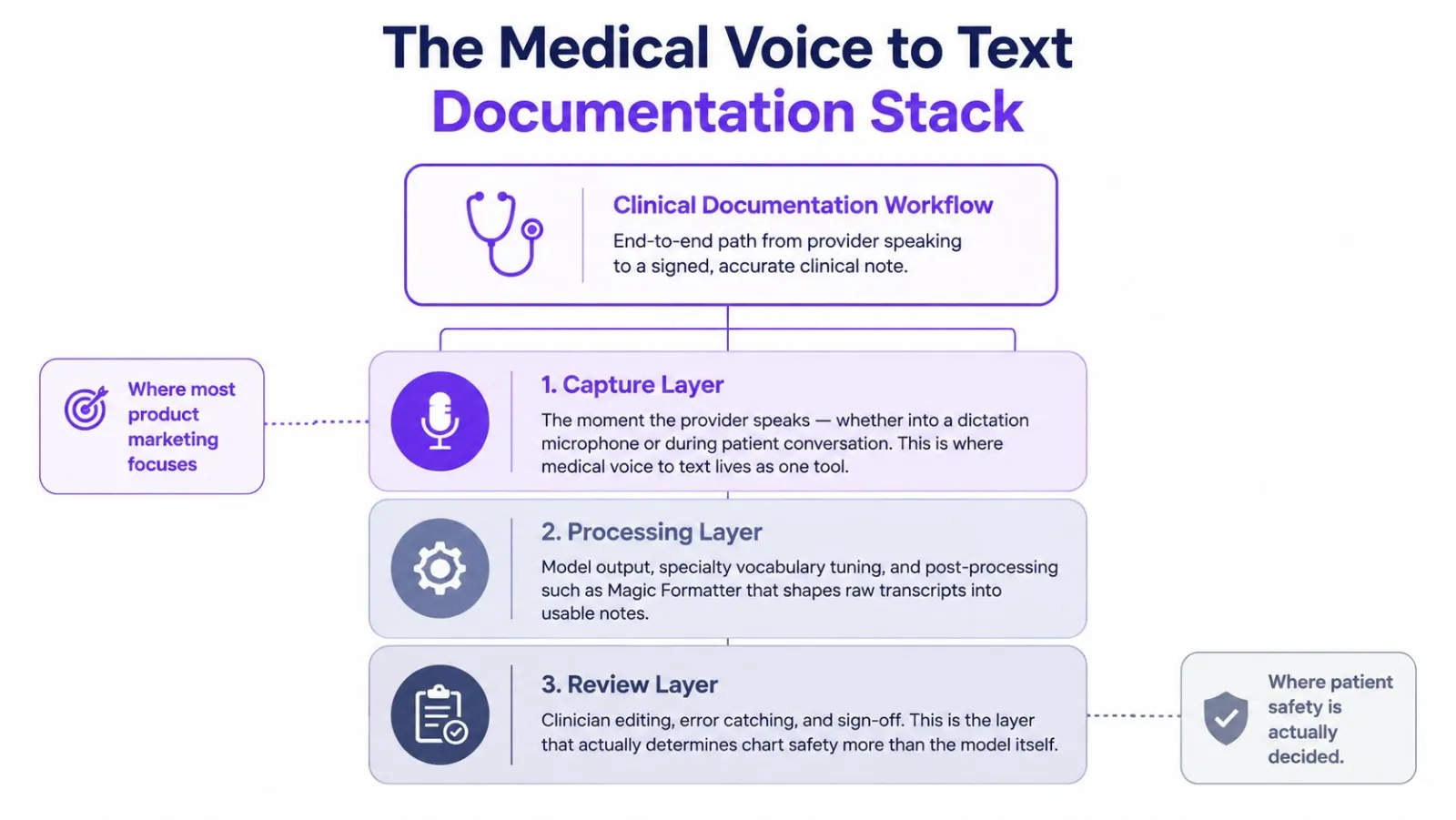
Practical rule: if there is no review layer, it's not a documentation system, it's a draft generator.
The evidence on clinical dictation has always been about more than speed. In one study, clinicians finished documentation in 5.11 minutes with speech recognition versus 8.9 minutes typing, which is why adoption took hold in the first place. But speed never solved the whole problem. Another clinical analysis found that speech-recognition notes had a raw error rate of 7.4%, which fell to 0.4% after transcriptionist review. The same work found that 96.3% of speech-recognition notes contained at least one error. So the question is not "does it work" but "where do we catch the mistakes."
What medical voice to text actually does
The system hears sound, breaks it into small acoustic pieces, matches those against medical language, and turns the result into text a clinician can use. The better systems go past the literal words and recognize context, specialty vocabulary, and the difference between a clinical phrase and ordinary conversation.
The pipeline from microphone to note
A domain-trained model matters because clinical language isn't generic language. Google's MedASR is a 105-million-parameter Conformer model trained on about 5,000 hours of de-identified physician dictations across specialties including radiology, internal medicine, and family medicine. It accepts mono-channel 16 kHz int16 audio and outputs text only. That tells you how medical speech systems are built: they are tuned on real clinical audio, not consumer dictation samples. Google's MedASR documentation is a good technical reference if you want to see how specialty modeling is framed.
What happens after the transcript matters just as much. A good pipeline includes vocabulary-aware post-processing, punctuation cleanup, and formatting logic that turns raw speech into a usable note. That layer is where many clinician-facing tools separate themselves from generic ASR. The model gets you close, but the formatting layer makes the output read like a chart entry instead of a transcript.
How to judge a product without being an engineer
Ask whether the product has three things, in this order:
- Acoustic recognition for the way people actually speak in your clinic.
- Specialty vocabulary handling for terms your team says every day.
- Post-processing that cleans up the note without mangling names, numbers, or clinical meaning.
If a vendor only talks about "AI-powered transcription," that's usually just the first layer. If it also supports custom vocabulary, custom style instructions, and reviewable diffs, you're looking at a fuller documentation system.
The custom dictionary for medical notes guide shows how vocabulary tuning is usually handled in practice. Medical voice to text works best when it understands the field, then lets people shape the output before they sign it.
Where medical voice to text goes wrong
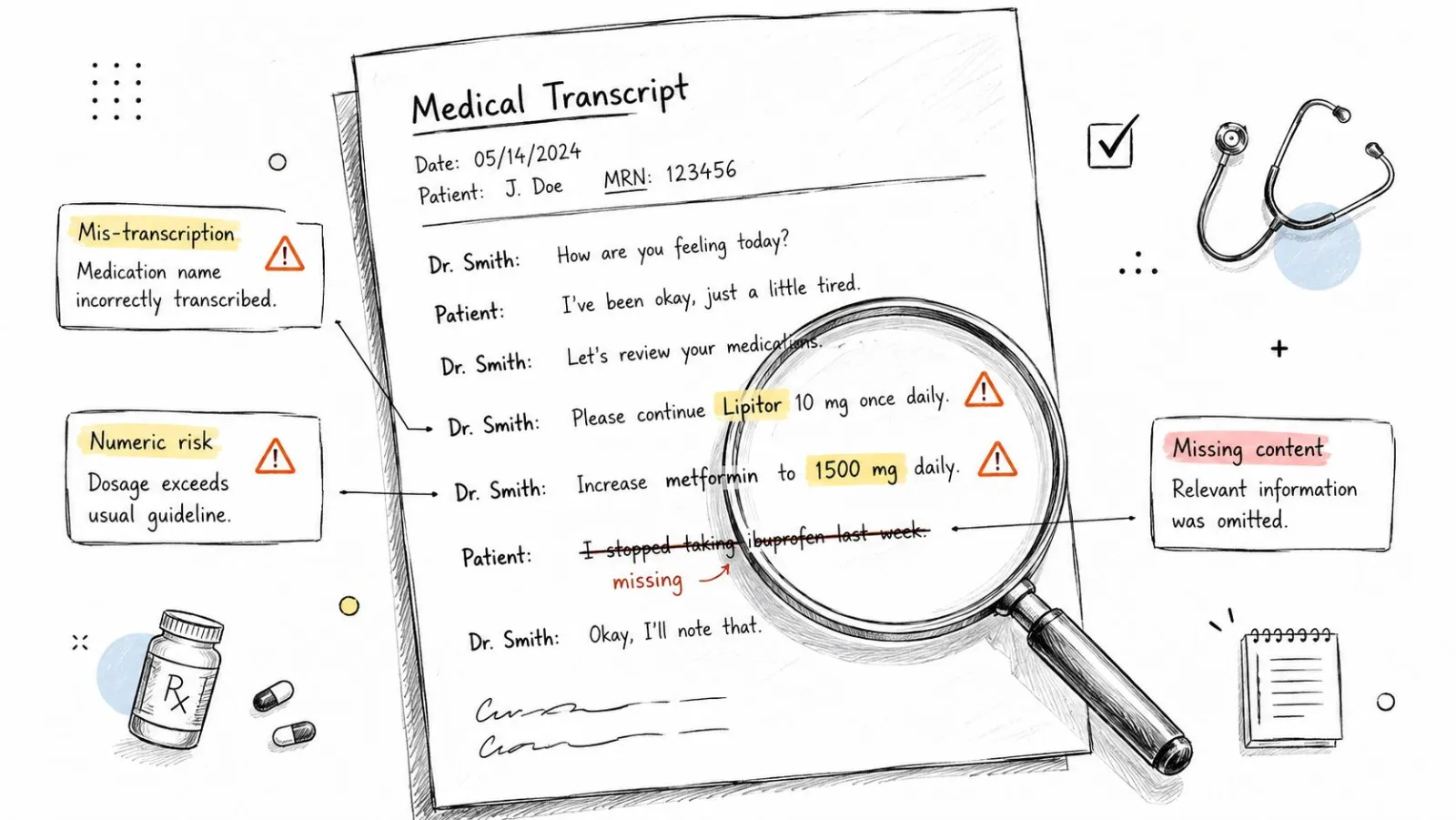
The failure modes are repetitive, and they're not random. Medications, dosages, and deletions cause the most anxiety because they change meaning instead of just making an ugly note. The JAMA Network Open analysis makes that visible in a way product marketing usually doesn't. Speech-recognition-generated notes had a 7.4% error rate, and 96.3% of notes had at least one error. Raw output is not something you can trust on its own.
The errors that actually matter clinically
The same study found that 15.8% of errors involved clinical information, the part that matters most when a note feeds downstream care. Deletions made up 34.7% of all errors and insertions 27.0%. That difference is clinically important. An extra word is annoying. A missing word can change the instruction, the assessment, or the billing trail.
A transcript can look polished and still be unsafe if it silently drops a dose, a negation, or a drug name.
That's why raw accuracy scores can mislead buyers. A system can do well on general prose and still struggle where the chart is most sensitive. Medication-heavy specialties, oncology, anesthesia, and any work full of abbreviations need tighter precision than a general follow-up visit. The final note has to preserve the exact clinical meaning, not approximate the sentence.
A 2024 clinical review on voice-to-text documentation found the output was generally comparable to or better than traditional documentation methods, while warning that inaccuracies in medication names can create safety risks. That is the right mental model. The technology can reduce burden and improve focus, but it still needs a guardrail wherever the words carry clinical consequences.
Why review is non-optional
Transcriptionist review cut the error rate to 0.4% in the same JAMA analysis, which is why older documentation programs paired automation with human proofreading. That isn't a failure of speech recognition, it's a design choice. If the note can affect a medication list, a dosage, or an order, someone needs to see it before it becomes part of the record.
Dictation versus conversation and why the split matters
A provider talking into a microphone and a provider speaking with a patient are not the same transcription problem. One is a long-form monologue. The other is a multi-speaker exchange with turn-taking, interruptions, and speaker changes. Google Cloud separates those into medical_dictation and medical_conversation, and that split is the right way to think about the market.
Two workflows, two engineering priorities
In dictation mode, the system is optimized for a single speaker. The main job is to keep long passages accurate and preserve medical terminology across a continuous note. In conversation mode, the system has to detect and label speakers while handling dialogue that moves back and forth. According to Google Cloud's medical ASR documentation, its medical models are tuned for terms common in diagnoses, medications, symptoms, treatments, and conditions, and the conversation model automatically detects and labels speakers.
That difference sounds technical, but it affects buying decisions. If a clinician spends most of the day narrating assessments into a note, dictation mode is the fit. If the clinician wants live support during a patient visit, conversation mode is. Buying one and expecting it to do the other job is where teams get disappointed.
The mismatch shows up in small ways first. Dictation tools handle long notes cleanly but may miss the back-and-forth structure of a visit. Conversation tools capture the exchange but may not hold the same long-form accuracy a solo dictation needs. The wrong model doesn't usually fail dramatically. It creates more edits, more cleanup, and more hesitation before sign-off.
Match the mode to the encounter
One question for any vendor: is this tuned for me talking into a microphone, or for a patient and me talking to each other? That distinction clarifies most of the product category. It also explains why some systems are impressive in demos and frustrating in daily use. Demo audio is clean, single-speaker, and predictable. Clinical reality is not.
Compliance, privacy, and the gap vendors gloss over
"HIPAA compliant" gets used as if it closes the loop. It doesn't. A vendor's privacy posture, the clinic's legal responsibilities, and the way staff use the tool are three separate layers. If any one of them is weak, the whole setup can still become a problem.
What the tool can cover and what it can't
Vibe Typer is a useful example because it's explicit about this. It does not store transcriptions, but it is not formally HIPAA compliant, so internal clinic procedures still have to govern its use. That's the part vendors often skip in marketing copy. Local or in-memory processing can reduce exposure, but it does not replace policy, access control, or the clinic's own compliance review. The local history and privacy handling page is a reminder that data handling and compliance posture are not the same thing.
The right compliance questions are boring, and they're still the right questions. Who can see the audio, if audio is kept at all? Where does the transcript live? How long is it retained? What logs exist? What is the clinic's review process for high-risk notes? Those matter more than a badge on a landing page.
The clinic still owns the use case
Agntz on AI security risks is a useful outside read on adjacent risk. It's not a healthcare article, but it shows that AI systems tend to fail at the edges, where permissions, data flow, and trust boundaries get fuzzy. That's where clinical teams should slow down.
If a tool processes speech but doesn't store transcripts, that reduces one kind of exposure. It doesn't remove the clinic's duty to use it correctly. Internal procedures still need to define when it's appropriate, who reviews output, what happens with sensitive specialties, and how exceptions get handled. That's the gap most vendor pages skip, and the one compliance teams notice first.
Practices that make medical dictation safer day to day
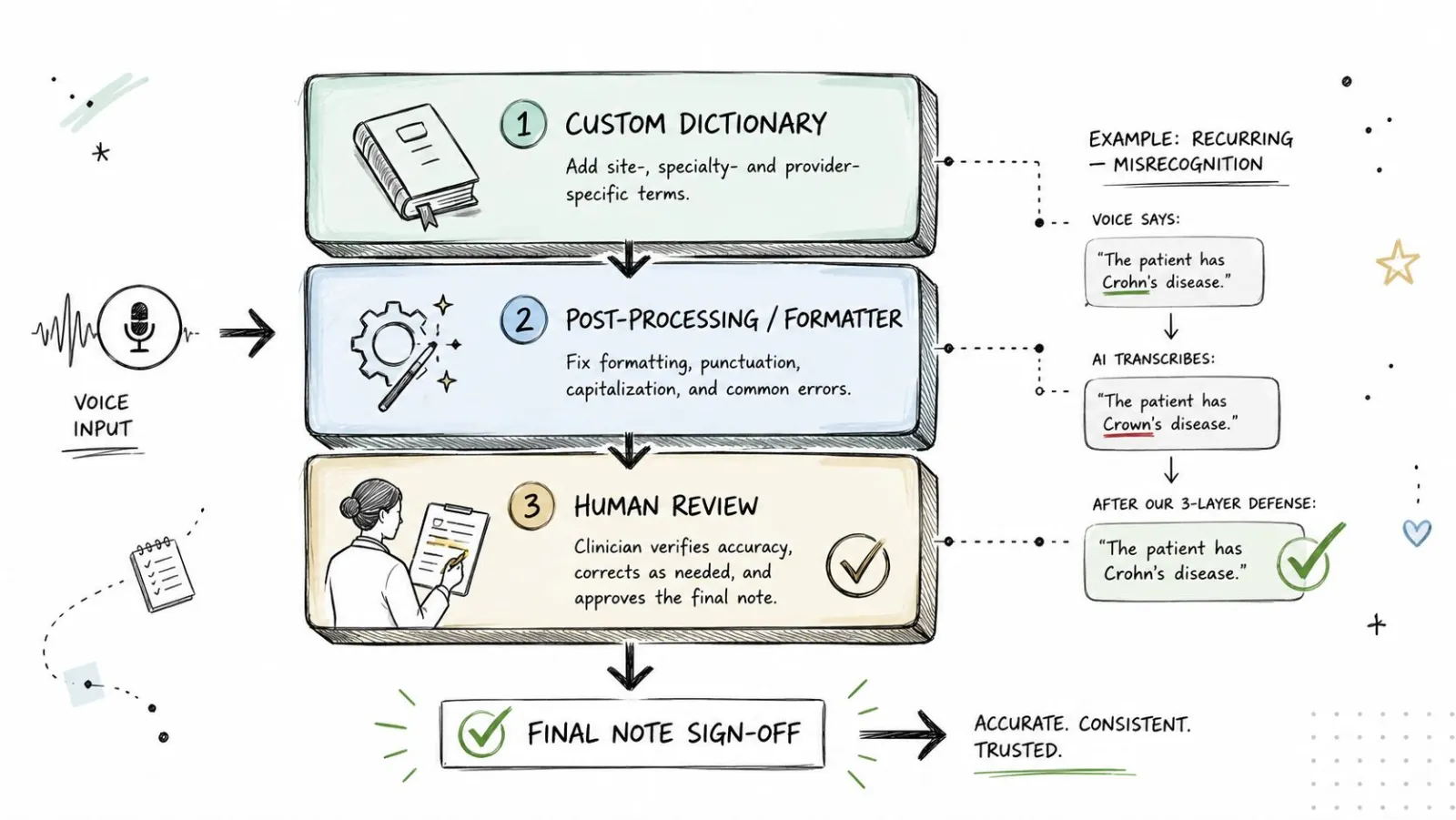
The safest teams don't rely on one fix. They teach the system the terms it's most likely to miss, add post-processing to clean up common misrecognitions, and make human review mandatory for notes that touch medication decisions or dosage language.
Build a vocabulary layer first
Names, abbreviations, and specialty jargon should not be left to chance. A custom dictionary is the cleanest way to stop repeated mistakes in a clinic that sees the same drugs, devices, and clinicians over and over. If a drug name keeps coming out wrong, fix the term once instead of correcting it in every note.
It also helps to give the formatter context in plain language. Telling the system that you're a physician using medical terminology gives the model a better target for cleanup. That isn't magic, it's conditioning. If your notes include recurring terms, acronyms, or department-specific phrasing, the formatter needs to know what kind of text it is shaping.
Practical rule: if the same word gets mistranscribed twice, move it into the dictionary instead of editing it by hand again.
Use post-processing, then review
Post-processing can catch filler words, normalize punctuation, and apply style instructions that make notes easier to read. Done carefully, it can also help preserve numbers and named entities. But it should never be the last checkpoint for anything high-stakes. Medication names and dosages deserve human eyes.
The order that works in practice:
- Custom dictionary first: add recurring names, acronyms, and specialty terms.
- Formatter second: clean up the transcript, remove filler, and apply style rules.
- Human review third: check anything involving drugs, numbers, allergies, or instructions.
A concrete example: if "metoprolol" keeps arriving as a similar-sounding wrong term, fix that mapping in the dictionary and test it on a fresh dictation. Then have the clinician scan the medication line before sign-off. That sequence is slower than blind automation, but it's safer and usually faster than endless manual correction.
Medical voice to text in daily practice is not there to remove judgment. It moves the first draft out of the way so judgment can go to the parts that matter.
Adopting medical voice to text without burning the clinic down
The case for adoption still starts with productivity, but it only works if the clinic treats transcription as a layered process. One industry summary reported that front-end speech recognition saves physicians 30 to 45 minutes a day, and that is why clinics keep testing these tools. Patients notice too. In a prospective study of 592 primary-care patients, 75.4% felt the provider was more focused on them, 78.8% felt the provider spent less time typing, and 80.9% felt the conversation was more personable when they knew an AI voice-to-text tool was in use. Those figures come from a systematic review of AI-powered voice-to-text documentation.
The adoption decision that holds up in real life
The clinics that get this right make four decisions in order. They choose the mode, dictation or conversation. They match the privacy posture to the clinic's compliance reality. They build a review layer that fits the specialty's risk profile. Then they measure whether the process saves time and catches errors, instead of only asking whether typing got faster.
Keep the pilot small enough to watch closely. Pick one process, one error-prone area, and one review checkpoint, then run it for two weeks before scaling. That gives staff time to see what breaks without turning the whole clinic into a test bed. A structured medical dictation pilot is the cleanest way to find out whether the tool helps or creates more cleanup.
The win is not cleaner typing. It is a note that gets written faster, reviewed properly, and signed with fewer surprises. If your clinic is evaluating medical voice to text, start with the process, not the marketing page, and make the review step part of the purchase decision from day one.
Try Vibe Typer free
Voice typing that works in every app on Linux, Windows, and macOS. Free to download: 2,000 words a month, no card.
Download free